

WooCommerce Popup lets you stop the blood before it starts. To get someone to buy, pop-ups can collect a guest visitor’s email address, remind a returning customer about their abandoned cart, or offer a discount at the right time.
Table of Contents
- How to Add a WooCommerce Popup to your Online Store
- Importance of WooCommerce Popups
- Types of WooCommerce Popups (And When to Use Each)
- What Makes a WooCommerce Popup Actually Convert
- How the WooCommerce Popup Solves the Guest Visitor Problem
- WooCommerce Popup Best Practices to Follow
- Start Recovering Sales You Are Already Losing
- Frequently Asked Questions (FAQs)
About 70% of people who add items to their shopping carts never complete the purchase. They move on to something else, start to doubt themselves, or just leave. Most shops can’t get them back once they’re sold out. If you put the pop-up in the right place, it will change everything.
It doesn’t feel annoying when it’s done right. How to set one up and, more importantly, how to make it work are both covered in this WooCommerce guide. So, if you also have problems with WooCommerce cart loss in general, this works well with a good recovery plan.
How to Add a WooCommerce Popup to your Online Store
WooCommerce doesn’t come with a built-in pop-up tool – you need a plugin to add one. Here is a step-by-step walkthrough using the Recover Abandoned Cart for WooCommerce plugin by StoreBoostKit, which handles both exit-intent popups for guest visitors and restore-cart popups for returning customers.
Quick note: Recover Abandoned Cart is built specifically for WooCommerce stores. Unlike generic WooCommerce pop-up builders, it’s directly connected to your cart and checkout data.
Step 1: Install the Plugin
Head to your WordPress dashboard and go to Plugins > Add New. Upload the plugin.zip file you downloaded from StoreBoostKit.
You can grab it directly from the Recover Abandoned Cart for WooCommerce page. Once uploaded, just click Activate and start using the tool to integrate WooCommerce Popup. No coding needed.
Step 2: Configure the Exit-Intent Popup for Guest Visitors
The WooCommerce exit-intent pop-up appears when a visitor moves their cursor toward the top of the browser, signaling they are about to leave. It is your last chance to grab their email before they disappear.
After activating the plugin, go to the plugin settings in your WordPress dashboard. Find the exit-intent pop-up section and enable it.
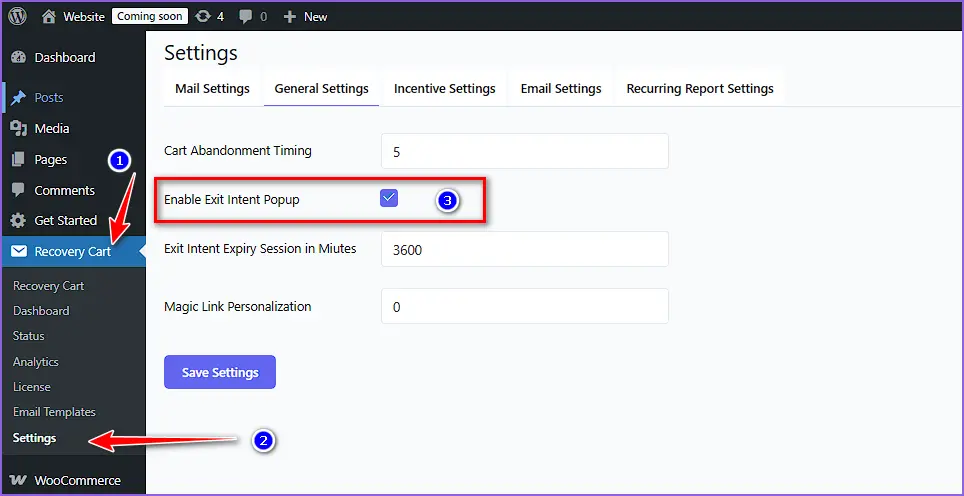
Here is what to configure:
- Headline: Writing something like “Don’t lose your cart!” works well because it is direct.
- Email field: This is what makes the WooCommerce Popup valuable. The plugin captures the email and links it to the abandoned cart session.
- CTA button: Use action-oriented text like “Save My Cart” instead of a generic “Submit.”
- Trigger timing: Exit-intent popups fire when the mouse moves toward the browser bar. No delay needed.
Tip: Keep the WooCommerce Popup simple. One headline, one email field, one button. Adding too much kills conversions.
Step 3: Enable the Restore Cart Popup for Returning Visitors
While exit-intent pop-ups collect email addresses from leaving visitors, the restore cart pop-up serves a different purpose. It shows up when someone who previously abandoned their cart comes back to your store. Instead of making them hunt for their products again, it shows a one-click option to pick up right where they left off.
In the plugin settings, enable the restore cart popup option. So, next time when a returning visitor lands on your site, they will see a small banner or pop-up that says something like “Continue where you left off” with a Recover Cart button.
This is especially powerful because the customer already showed intent. They just need a nudge, not a hard sell.
Step 4: Set Up the Recovery Email Sequence
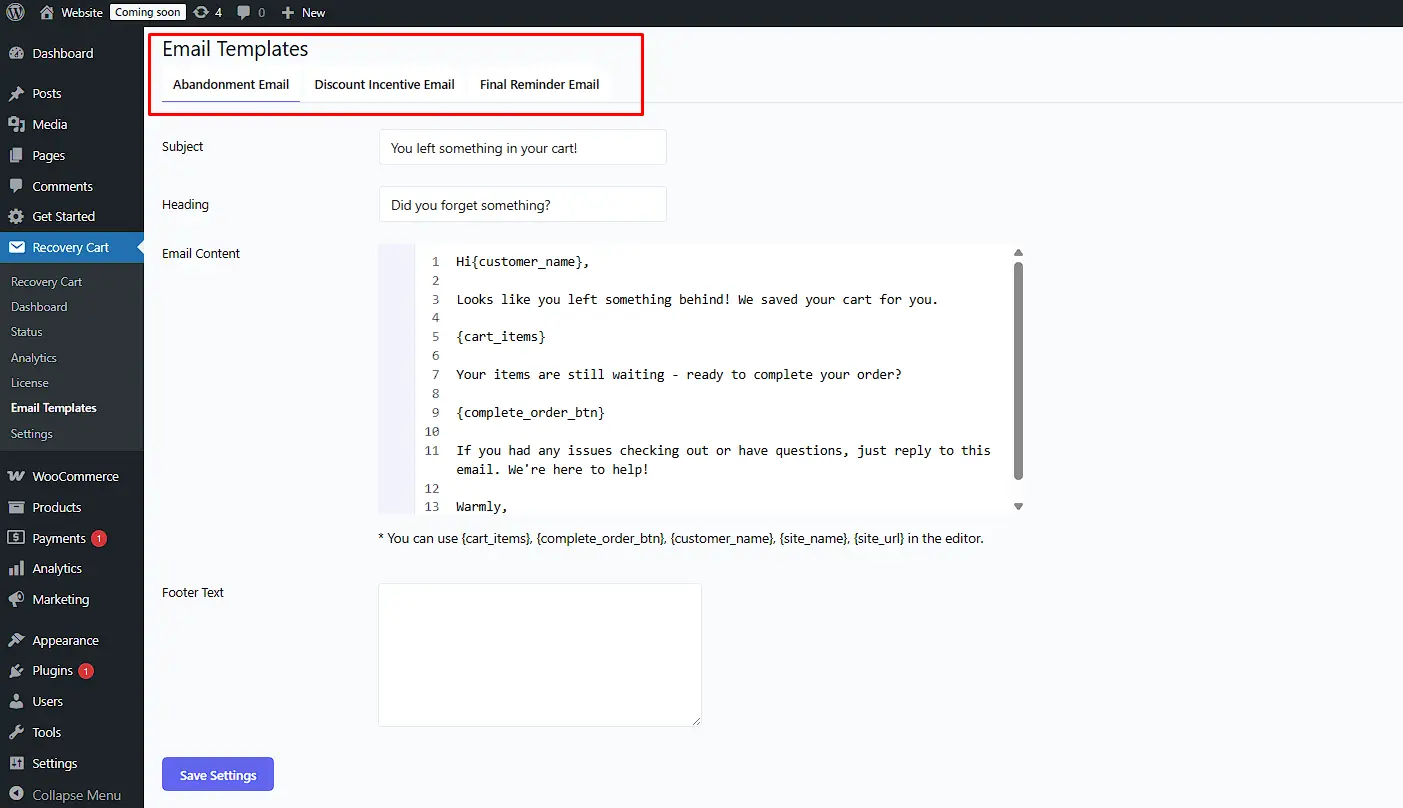
The WooCommerce pop-up captures the email. But the real recovery work happens in the follow-up. The plugin lets you set up automated emails that go out at custom intervals, like 1 hour, 24 hours, and 48 hours after abandonment. If you want a deeper look at how this fits into a broader strategy, check out these 12 ways to reduce cart abandonment.
In the email settings, you can:
- Write custom email templates using mail tags that pull in the customer name, cart items, and total.
- Add a discount incentive like a percentage off or free shipping to the recovery email.
- Include a one-click recovery link that restores the cart automatically when clicked, no login required.
Step 5: Configure Display Conditions
You don’t want your exit-intent pop-up firing on the checkout page. That would interrupt someone who is literally trying to pay you. Set your display conditions carefully.
Recommended settings:
- Show the exit-intent popup on the cart page, product pages, and the shop page.
- Hide it from the checkout page and the order confirmation page.
- Show the restore cart popup sitewide for returning visitors who have an abandoned session.
Step 6: Test Before You Go Live
Open an incognito browser window and visit your store. Add a product to your cart, then move your cursor toward the top of the browser. The exit-intent pop-up should appear.
Check that:
- The popup looks right on mobile and desktop.
- Submitting the email form works and logs the session.
- The restore cart pop-up appears when you return to the store in a new session.
Once everything works, you are live.
Importance of WooCommerce Popups
A WooCommerce Popup works because it shows up at exactly the right moment. Unlike a banner that sits on the page and gets ignored, a popup demands attention. When the timing and offer are right, it feels less like an interruption and more like a helpful reminder.
Here is what they can actually do for your store:
- Capture guest emails: Most guest visitors browse and leave without a trace. An exit-intent popup gives you a way to follow up.
- Recover abandoned carts: A restore cart popup removes friction for returning visitors. One click and they are back in checkout.
- Promote time-sensitive offers: A discount popup with urgency, like “10% off for the next 30 minutes,” can flip a hesitant buyer.
- Upsell and cross-sell: Show a related product popup after someone adds an item to their cart.
The key to all of this is timing. A popup shown too early feels aggressive. Shown at the right moment, it feels useful.
Types of WooCommerce Popups (And When to Use Each)
Not every pop-up serves the same purpose. Using the wrong type at the wrong moment is what gives WooCommerce Popups a bad reputation. But when you match the right pop-up to the right situation, they don’t just convert, they enhance the shopping experience.
Here’s a quick breakdown of the main types and when each one makes sense:
1. WooCommerce Exit Intent Popup
Exit-intent pop-up triggers when a visitor moves their cursor toward the browser bar, signaling they are about to leave. This is the best WooCommerce pop-up for capturing guest emails and reducing cart abandonment. It is your last-ditch effort before they are gone. Use it to offer a discount, free shipping, or a lead magnet when hope is fading.
2. Restore Cart Popup
Shows up when a returning visitor comes back to your store after leaving items in their cart. It is not about capturing new leads. It is about removing friction for someone who already wants to buy. A simple “Continue where you left off” with one click is all it takes. Best used on the homepage or shop page for known returning visitors.
3. Welcome Popup
Appears when someone lands on your site for the first time, usually after a few seconds. Works well for building your email list in exchange for a first-order discount. Keep the offer clear, make it easy to dismiss, and avoid showing it again once they’ve subscribed or closed it.
4. Coupon or Discount Popup
Triggered by time on page or scroll depth. Works best on product pages when someone lingers but does not add to the cart. A targeted discount like “Here is 10% off this item” can be the push they need. Use this for hesitation, not for every casual browser.
5. Upsell or Cross-Sell Popup
Fires after someone adds a product to their cart. Suggests a complementary item, like a phone case, after adding a phone, or a warranty after adding a laptop. Keep it highly relevant. An irrelevant upsell popup just annoys people and risks cart abandonment. Best used on cart or checkout pages.
Choosing the right WooCommerce Popup isn’t about using as many as possible – it’s about using the right one at the right moment in the customer’s journey. Respect your customer’s time and intent. A well-timed, relevant popup feels helpful, not intrusive.
What Makes a WooCommerce Popup Actually Convert
A popup that converts well isn’t about flashy design or clever animations. It’s about showing the right message to the right person at the right time. In fact, while the average popup submit rate hovers around 4.65%, the top 10% of performers achieve conversion rates as high as 19.77%. The difference comes down to a few critical factors.
Here’s what makes a WooCommerce popup convert visitors into sales:
Nail the Trigger with a WooCommerce Popup
The trigger is everything. Exit-intent popups work because they catch people at the exact moment of leaving. This is the most behavior-sensitive option for cart recovery, and experts recommend avoiding immediate or time-based triggers for this purpose
On the other hand, time-based triggers work on product pages where someone is considering a purchase. Scroll-based triggers work well for long pages where reaching 50% of the content signals real interest. Welcome and discount popups build your list and overcome hesitation, whereas upsell popups increase order value when done thoughtfully.
Most purchases are abandoned when a browser tab goes inactive, not when someone closes the window. This means customers are often distracted or comparing options across multiple tabs, so your popup needs to reach them from anywhere on your site, not just the cart or checkout page
Keep the Pop-up Copy Short
Your headline should say one thing clearly. “Don’t lose your cart” is stronger than “We noticed you were looking at some amazing products.” The principles of effective marketing copy apply here: clarity, persuasion, and emotional connection. Your call-to-action (CTA) should tell people exactly what happens when they click. “Save My Cart” beats “Submit” every single time.
The best-performing pop-ups follow a clear message hierarchy: the offer first, followed by the value proposition, then the CTA that references value to the customer
Make the Offer Worth It
If you’re asking for an email, give something in return. Free shipping, a discount code, or anything that can make a customer happy with a feeling of getting some extra. But here’s the counterintuitive part: bigger discounts don’t always mean more conversions. One apparel brand tested increasing their welcome offer and saw no increase in conversion rate. Why? Larger discounts can make customers suspicious or diminish their perception of your product’s value.
What works better is a reasonable offer that feels both valuable and believable. A 10% discount on a first purchase often outperforms 20% because it maintains brand value while still providing motivation.
Design your WooCommerce Popup for Mobile First
More than half of WooCommerce traffic comes from mobile devices, and mobile commerce is forecast to reach 70% of retail ecommerce sales. A popup that works beautifully on desktop but covers the entire mobile screen – with tiny fonts and a hidden close button will get dismissed instantly.
Mobile-first design means considering smaller screens from the start. Test on a real phone, not just a browser’s responsive preview. Ensure close buttons are large enough to tap, forms fit without horizontal scrolling, and the popup doesn’t hijack the entire screen.
Set a Frequency Cap
Showing the same popup every time someone visits is how you train people to ignore your store. This is called “frequency fatigue”. Repeated exposure to the same message without variation leads to annoyance and lower engagement .
Best practices recommend showing a popup once per session or once per hour for active visitors . For cart recovery specifically, set cookies to prevent the popup from reappearing for at least a month after a visitor has seen or closed it. Use cookies to control how often specific users see a particular popup based on their behavior and history.
What Hurts Conversion Rates:
According to industry data, low popup submission rates are typically caused by the following:
| Problem | Impact |
| Poor timing (too early or too late) | Feels intrusive or misses the opportunity |
| Lack of segmentation | Irrelevant messaging fails to convert |
| High friction (too many fields, double opt-in) | Increases effort required to subscribe |
| Poor mobile optimization | Frustrating user experience |
| Frequency fatigue | Repeated annoyance trains visitors to ignore |
The shift from viewing popups as interruptions to treating them as personalized value exchanges is what separates top-performing stores from the rest.
How the WooCommerce Popup Solves the Guest Visitor Problem
Guest visitors are the hardest group to recover after they leave. Unlike registered customers, there is no account, no saved email, and no way to follow up. This is a big part of what makes checkout abandonment so costly for WooCommerce stores.
An exit-intent WooCommerce Popup solves this by capturing their email before they leave. When a guest visitor enters their email in the popup, the plugin links that email to the cart session. Even though they never created an account, you now have a way to reach them. From there, the automated recovery sequence does the work. A well-timed email with their cart items and a recovery link can bring a significant portion of those visitors back to complete the purchase.
This is the feature that separates a purpose-built cart recovery tool from a generic popup plugin. Generic tools capture emails. A tool like Recover Abandoned Cart for WooCommerce captures emails and connects them to the cart data so you can actually recover the sale.
WooCommerce Popup Best Practices to Follow
Getting a WooCommerce Popup live is the easy part. Getting it to actually work is where most stores fall short. Here are the things that separate a high-performing popup from one that just annoys visitors:
- One goal per popup: Don’t try to capture an email, show a discount, and promote a product all at once.
- Match the popup to the page: A cart page popup should reference the cart. A product page popup should reference that product. Otherwise, generic popups feel lazy.
- A/B test your headline: Try two different headlines over a week and see which one gets more submissions. Small wording changes can have a big impact.
- Pair the popup with a follow-up email: The popup captures the lead, and the email closes the sale.
- Don’t hide the close button: A popup that is hard to dismiss creates frustration, not conversions.
If you are building out your full WooCommerce toolkit, take a look at these 5 must-have WordPress plugins for WooCommerce stores to see what else can help to boost your sales.
Start Recovering Sales You Are Already Losing
A WooCommerce Popup is not just a marketing tactic. It is a practical fix for a real problem. Every day, visitors leave your store with products sitting in their cart and no way for you to reach them. A well-set-up WooCommerce popup, especially one that captures guest emails before they leave, changes that.
The steps in this guide are enough to get you started today. Install the plugin, turn on the WooCommerce exit-intent popup and the restore cart popup, write one clear recovery email, and you are already ahead of most WooCommerce stores.
If you want a tool that handles all of this without the complexity, Recover Abandoned Cart for WooCommerce is built specifically for this job. It covers exit-intent popups, guest email capture, restore cart popups, automated recovery emails, and detailed analytics, all in one place. You can try it risk-free with a 30-day money-back guarantee.
Have questions before you get started? The StoreBoostKit team is happy to help.
Frequently Asked Questions (FAQs)
Q: Can I show a WooCommerce popup on the checkout page?
A: You can, but you generally should not. Interrupting someone who is actively filling out their payment details is a great way to lose the sale. Keep popups off the checkout page. Use them on product pages, the cart page, and the shop page instead.
Q: How do I show a popup only once per visitor?
A: Most popup plugins, including Recover Abandoned Cart for WooCommerce, let you set a frequency cap. You can configure it to show once per session or once every set number of days so you are not hammering the same visitor with the same message every time.
Q: Do popups hurt WooCommerce SEO?
A: A popup itself does not hurt SEO. But a popup that blocks content on mobile and is hard to close could trigger a Google penalty for intrusive interstitials. Keep your popups easy to dismiss on mobile and avoid full-screen overlays on the initial page load.
Q: Can I capture guest emails with a WooCommerce popup?
A: Yes, and this is one of the most valuable things a popup can do. When a guest visitor enters their email in an exit-intent popup, the plugin saves that email and links it to their cart session. This lets you send recovery emails even to visitors who never created an account.
Q: What is the best trigger for a cart abandonment popup?
A: Exit-intent is the most effective trigger for cart abandonment. It fires at the moment of leaving rather than interrupting the shopping session. Combine it with a clear offer, like a saved cart link or a small discount, and you have a solid recovery tool.
Q: How many popups should I run at the same time?
A: Two or three is the practical limit. One exit-intent popup, one restore cart popup for returning visitors, and maybe one welcome popup for first-time visitors. Running too many at once creates conflicts and a poor user experience.
