

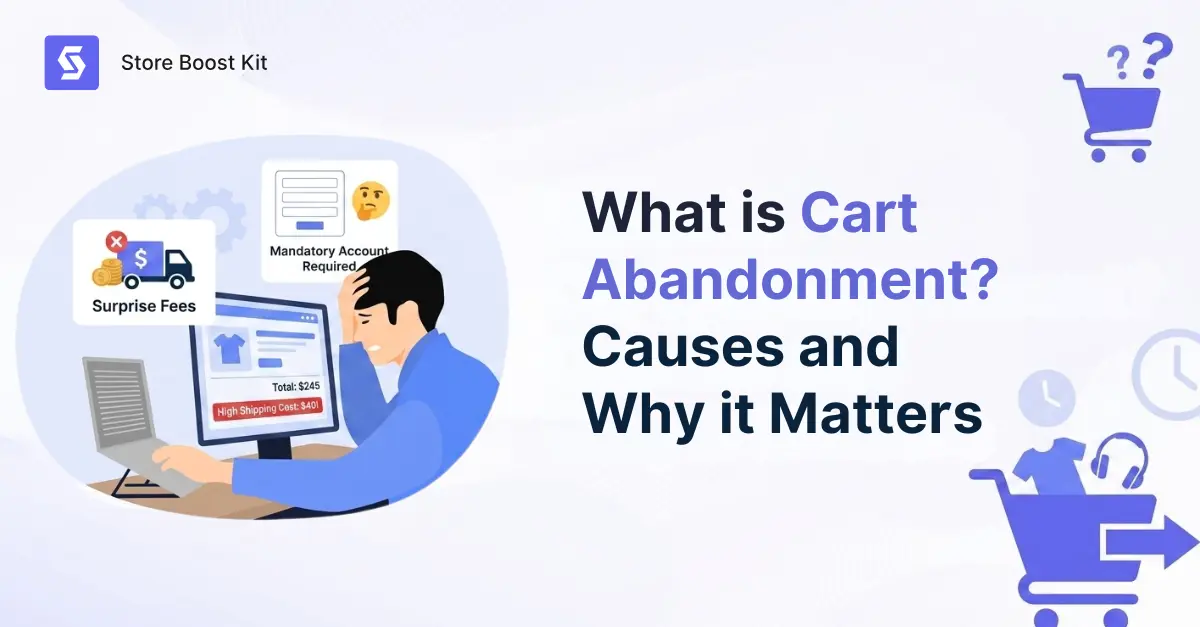
What is cart abandonment? It’s when someone visits your store, adds products to their cart, and then leaves without buying. No purchase.
Table of Contents
- What Is Cart Abandonment in WooCommerce?
- What is Cart Abandonment vs. Checkout Abandonment?
- How Common Is Cart Abandonment in WooCommerce?
- Reasons for WooCommerce Cart Abandonment
- Is Cart Abandonment Always a Lost Sale?
- What is Cart Abandonment Rate & How is it Measured?
- What Is Cart Abandonment Recovery?
- Why Cart Abandonment Matters for WooCommerce Stores
- Frequently Asked Questions (FAQs)
- Conclusion
No explanation. Just gone.
And if you run a WooCommerce store, cart abandonment is happening every single day. The tricky part is that these weren’t random visitors. They found your store, looked at your products, and took real action. They just didn’t finish.
Understanding cart abandonment is the first step to fixing it. This guide covers why it happens, how to measure it, and how to recover those lost sales with an effective WordPress abandoned shopping cart recovery plugin for WooCommerce.
What Is Cart Abandonment in WooCommerce?
Shopping cart abandonment happens when a shopper adds items to their online cart but leaves the site before completing the purchase. They found a product they liked. They added it to their cart. Then they abandoned the cart without finishing the purchase.
Think of a customer in a physical store who fills their basket, walks to the counter, then quietly puts everything back and walks out. That’s the same thing, just online. And it frequently happens thousands of times a day across every type of e-commerce store.
Online shopping requires almost no upfront effort. Browsing is free. Adding to a cart is one click. The real commitment comes at checkout, and that’s where people pause. They compare prices. They get distracted. They save items for later. Most aren’t rejecting your store. They’re just shopping in pieces.
None of that means your store is doing something wrong. But cart abandonment does mean money is leaving every day. And a good portion of abandoned carts can be recovered with the right system in place.
What is Cart Abandonment vs. Checkout Abandonment?
These two terms often get used interchangeably, but they describe different problems at different points in the buying journey.
Cart abandonment happens before checkout even starts. The shopper added an item to their cart but never clicked through to complete the purchase.
Checkout abandonment happens inside the checkout flow. They started the process but stopped somewhere along the way, maybe at the shipping step or at payment.
Here’s a simple comparison between cart abandonment and checkout abandonment: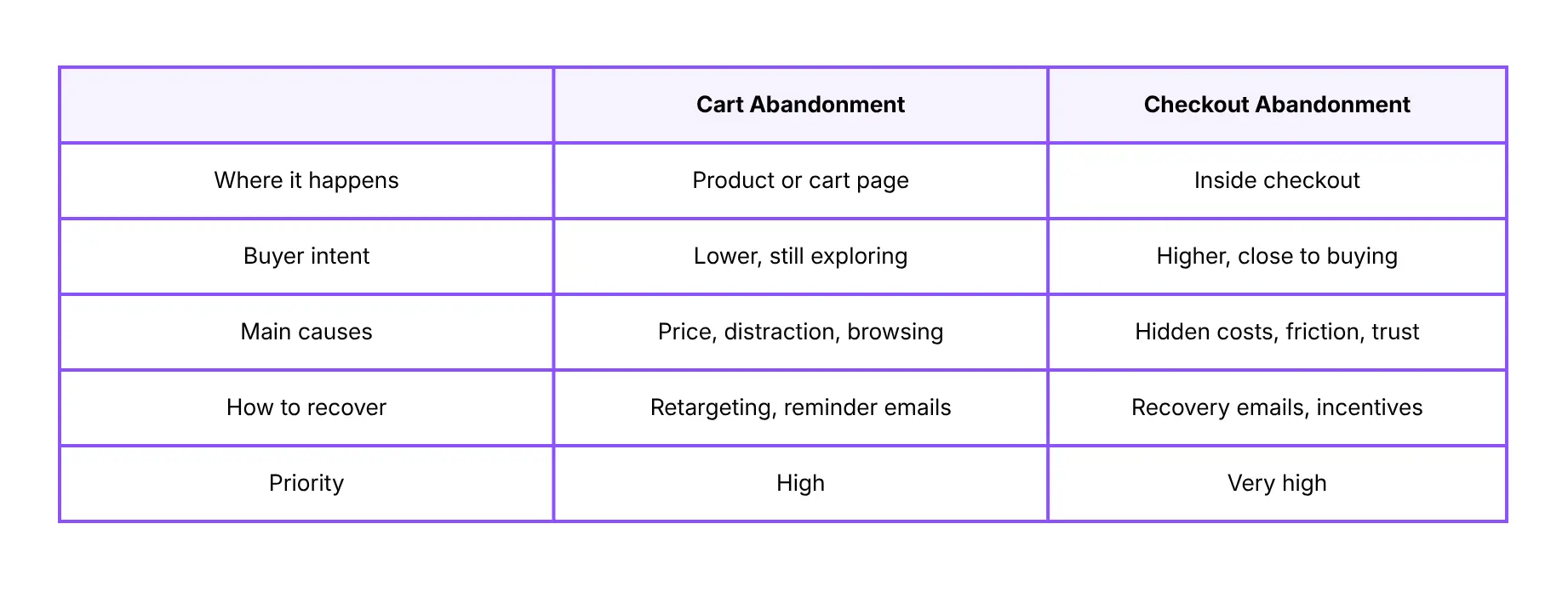 Checkout abandonment hurts more because those customers were almost there. Something specific pushed them away at the final moment, and that’s usually fixable. Cart abandonment, on the other hand, is higher in volume, but it includes a lot of people who were just browsing and never fully committed. Both are worth addressing. They just need different approaches.
Understanding the difference between the two helps you target cart abandonment and checkout abandonment separately, rather than treating them as one problem.
How Common Is Cart Abandonment in WooCommerce?
Very common. And your WooCommerce store is almost certainly not the exception.
The Baymard Institute has tracked cart abandonment rates across dozens of studies. Their data puts the average between 66% and 70%. That means roughly 7 out of 10 people who add something to a cart don’t complete the purchase.
Most people treat online shopping as a casual activity. They browse, compare, and add things to carts as part of their research. So a high cart abandonment rate often reflects normal shopping behavior, not a broken store.
That said, rates vary by industry:
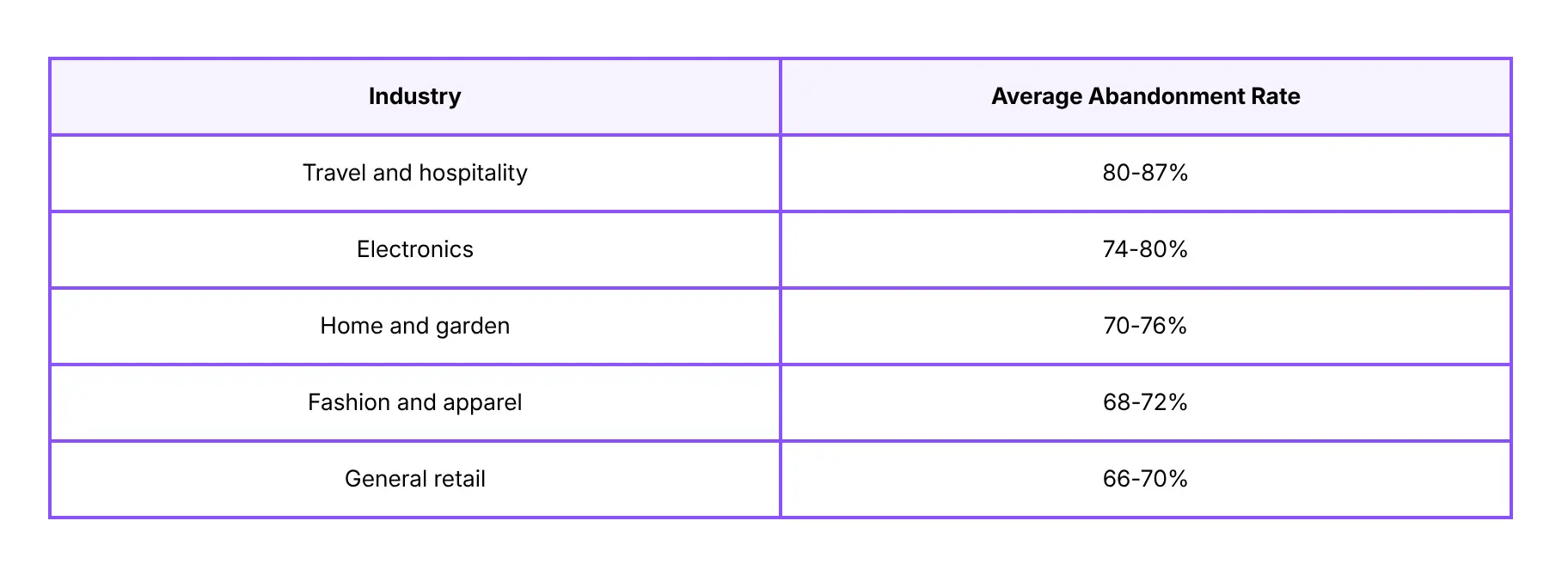 Higher-ticket items naturally see more hesitation. Someone buying a $600 laptop takes longer to decide than someone buying a $15 phone case. That’s expected, and the data reflects it. Still, the money adds up fast. Cart abandonment costs the e-commerce industry over $260 billion in lost sales every year. For your own store, it’s worth putting real numbers to it.
Say you get 1,000 cart sessions a month at a $75 average order value. At 70% abandonment, that’s $52,500 in revenue that never converts. Not all of it is recoverable. But a meaningful chunk of it is, with the right follow-up in place.
But here is the good news. A lot of those lost sales can be recovered. If you run a WooCommerce store, you can use a plugin like Recover Abandoned Cart for WooCommerce. It automatically sends follow-up emails, captures guest checkouts, and even shows returning customers a pop-up to restore their cart instantly.
Reasons for WooCommerce Cart Abandonment
There’s rarely one single cause. Most of the time, it’s a friction point, something that makes the customer stop and reconsider at the wrong moment.
The data below comes from the Baymard Institute’s checkout usability research.
Let’s see the main reasons for Cart Abandonment in a WooCommerce store:
Unexpected Costs at Checkout
Unexpected costs are the number one driver of cart abandonment, year after year.
A shopper picks a $40 product, heads to checkout, and suddenly sees $14 in shipping fees. That’s a 35% price jump at the worst possible moment. The issue isn’t always the cost itself. It’s the surprise. When a hidden charge appears at the end, it breaks the customer’s expectations and creates doubt. And doubt leads to leaving.
How to Fix it: Show shipping costs early. Set a free shipping threshold so shoppers know what they’re working toward. Or build delivery into your product price so the number they see is the number they pay.
Forced Account Creation
Most people don’t want to create an account just to buy something once. Registration feels like a commitment. When first-time buyers hit a registration wall at checkout, many just leave.
The fix is simple: Enable guest checkout. You can always invite them to create an account after the order is placed, when there’s actually a good reason to do so.
Checkout Complexity and Technical Issues
Long checkouts lose people. Too many steps, confusing form fields, or unclear error messages all chip away at patience.
More than half of online shopping happens on phones. A slow or clunky mobile checkout is enough to lose the sale entirely. Payment options matter too. If someone can’t find their preferred method, most won’t bother typing in their card number manually.
Fix: Cut unnecessary steps, test your checkout on an actual phone, and offer the payment methods your customers use the most.
Poor Validation and Confusing Error Messages
When a customer fills out a form incorrectly and gets a vague error message, they often can’t figure out what went wrong. So they give up.
Solution: Show inline errors in real time, explain exactly what’s wrong, and make it easy to correct. A customer who can fix their mistake quickly will almost always complete the purchase.
Distractions and Bad Timing
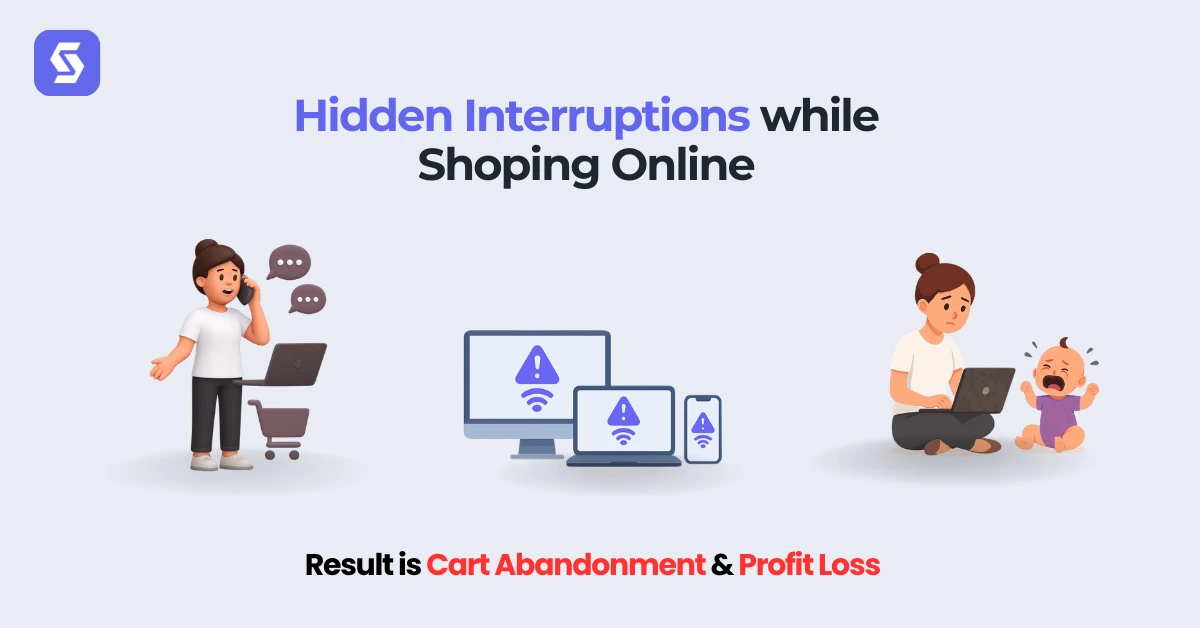
Not every abandonment is your fault. A phone rings, a meeting starts, the tab gets closed with every intention of coming back, and it never happens. The product was right. The price was fine. The timing was just off.
Solution: Exit intent popups can catch people right before they leave. Recovery emails reach them shortly after. Both tools exist for exactly this situation.
Browsing or Price Comparing
Some shoppers add to cart as a way of bookmarking, not as a sign they’re ready to buy.
They have three tabs open, comparing prices, wanting to sleep on it. These are still warm leads. They showed specific interest in a specific product, which already puts them ahead of most of your site traffic. A well-timed follow-up email is often enough to bring them back.
Is Cart Abandonment Always a Lost Sale?
No. And thinking of it that way makes cart abandonment recovery harder than it needs to be.
An abandoned cart is not a rejection. It’s a pause. The customer found your store, picked a product, and added it to their cart. That’s the real intent. Most people don’t add things to carts just to browse.
A shopper who left a $90 item in their cart is far closer to buying than someone who has never heard of your store. A reminder email might be enough to bring them back. A small discount might close it. Sometimes, just a message saying “your cart is still here” does the job, because the interest was already there.
You’re not convincing someone who doesn’t want the product. You’re simply reaching someone who already does.
Stores that treat cart abandonment as a lead opportunity, not a lost cause, consistently recover more revenue than those that don’t follow up at all.
What is Cart Abandonment Rate & How is it Measured?
So, what is cart abandonment rate? Well, your cart abandonment rate shows the percentage of cart sessions that don’t end in a purchase. The formula is simple:
Cart Abandonment Rate = (1 – Completed Purchases / Cart Sessions) x 100
For example: 600 cart sessions, 180 completed purchases.
(1 – 180/600) x 100 = 70%
You can track this in Google Analytics with e-commerce events enabled. WooCommerce connects to GA4 through several popular plugins. Once it’s set up, you can see exactly how many people added to the cart versus how many actually bought.
It’s also worth tracking checkout abandonment separately. That’s the number of people who started filling out checkout but never finished. The two numbers point to different problems.
A high cart abandonment rate means people aren’t even reaching checkout. That usually points to pricing, product trust, or weak calls to action.
A high checkout abandonment rate means people start the process but stop somewhere in the middle. That usually comes down to a specific friction point like an unexpected fee, too many steps, or a missing payment option.
Knowing which number is worse tells you exactly where to focus first.
Check these numbers monthly. They shift when you run promotions, update your store, or change where your traffic comes from. A sudden spike after a site change is always worth looking into quickly.
What Is Cart Abandonment Recovery?
Cart abandonment recovery means reaching customers who left and bringing them back to complete the purchase.
It’s not about pushing people. It’s about showing up at the right time with the right message. Most people who abandon a cart weren’t saying no to your product. They got distracted, hit a snag, or just weren’t ready at that exact moment. A well-timed follow-up can change the outcome for a lot of them.
The most effective tool for this is automated email sequences.
When someone abandons their cart, an email goes out automatically, usually within one to two hours. It shows what they left behind and links straight back to their cart. No searching. No friction. One click and they’re right where they stopped.
Timing matters a great deal. Emails sent within the first hour consistently outperform those sent later. According to Omnisend’s email marketing data, abandoned cart emails get far higher open and click rates than standard promotional emails. The reason is simple: the customer was just thinking about buying, so the message lands at exactly the right moment.
One email is a start. A short sequence, however, works considerably better. Here’s a simple three-email structure:
- Email 1 (1-2 hours after abandoning): A plain reminder. Show the product. Link back to the cart. Keep it short and friendly.
- Email 2 (24 hours later): Add a little more weight. A customer review, a product detail, or an answer to a common question about the item.
- Email 3 (48-72 hours later): If they still haven’t returned, a small incentive can close it. Free shipping or a time-limited discount gives them a concrete reason to act now.
Basic recovery setups typically bring back 2-4% of abandoned carts. Stores using more complete automation, including guest checkout capture and sequences tailored to cart value, can reach 15-30%, according to Klaviyo’s e-commerce benchmarks.
The difference between those two numbers usually comes down to whether guest shoppers are captured before they leave and how fast that first email goes out. Both are solvable problems with the right plugin.
For WooCommerce stores without a recovery system yet, the abandoned shopping cart recovery plugin handles all of it automatically. It captures guest emails before they go, sends timed sequences, and lets returning customers restore their cart in one click.
Why Cart Abandonment Matters for WooCommerce Stores
WooCommerce is flexible, but it comes with very little built in when it comes to cart recovery.
Shopify has native recovery features out of the box. WooCommerce does not. No recovery emails, no guest capture, no session saving, and no reporting on what you’re losing each month. You have to add all of that yourself, usually through a plugin.
This becomes a real problem when you’re paying for traffic. Every click from a Meta or Google ad costs money. When someone abandons their cart after clicking your ad, that money is already spent. Without a recovery system, there’s no second chance. The lead is just gone.
Most store owners don’t feel this until they actually run the numbers. Once they see how much revenue is slipping through, recovery becomes an obvious priority.
The good news is that once a recovery system is set up, it runs on its own. It works quietly in the background, automatically reaching people who have left and bringing some of them back.
Beyond cart recovery, pairing it with a review follow-up plugin is a smart next move. Customers who do complete a purchase are a great source of social proof, and reviews help convert future shoppers more easily. If you want a broader look at tools worth adding, this guide on must-have WooCommerce plugins covers the essentials.
Recovering a lost sale costs far less than finding a brand-new customer through paid ads. You already did the hard work of getting that person to your store and getting them interested. Recovery is simply the follow-through.
Frequently Asked Questions (FAQs)
Q: What is cart abandonment?
A: It’s when a shopper adds items to their cart but leaves without completing the purchase. According to the Baymard Institute, around 70% of online shoppers do this, making it one of the most common challenges in e-commerce.
Q: Why do customers abandon their carts?
A: Unexpected shipping costs are the top reason. Others include forced account creation, a long or confusing checkout process, limited payment options, and everyday distractions that pull people away before they finish.
Q: Am I losing orders due to cart abandonment?
A: Almost certainly. If your store gets regular traffic, some of those visitors are adding to the cart and leaving without buying. The average store loses around 70% of cart sessions this way. Tracking your abandonment rate in Google Analytics will show you exactly how much you’re losing each month.
Q: Will this plugin affect the speed of my website?
A: No. The Recover Abandoned Cart for WooCommerce plugin is lightweight and built to run in the background without adding noticeable load to your site. It won’t slow down your pages or affect your store’s performance.
Q: What is a good cart abandonment rate?
A: The industry average is 66-70%. Getting below 60% consistently is strong. Focus on improving your own rate over time rather than chasing a generic industry benchmark.
Q: Can abandoned carts be recovered?
A: Yes. Automated email sequences are the most reliable method. Basic setups recover 2-4% of abandoned carts. More advanced automation with guest capture and personalized timing can reach 15-30%. The faster you follow up, the better the results.
Conclusion
What is cart abandonment costing your store right now? Probably more than you think. But the good news is that a solid recovery system turns a big chunk of those lost sessions into completed orders.
If you’re on WooCommerce and want help setting that up, get in touch with us, and we’ll point you in the right direction. Or head straight to the abandoned shopping cart recovery plugin page to see exactly how it works.
The interest was already there. You just need to reach them.
