

Fixing the reasons shoppers leave and setting up automated recovery systems to reduce cart abandonment will help you increase the number of shoppers who complete their purchases. More than 70% of people who start shopping online end up buying nothing. This means that for every $100 that could be made, $70 is lost because people leave their shopping carts. That number is important to you if you have a WooCommerce shop.
Table of Contents
- What Is Cart Abandonment?
- Why Cart Abandonment Happens?
- 12 Proven Ways to Reduce Cart Abandonment in WooCommerce
- How to Reduce Cart Abandonment on Mobile
- How to Reduce Cart Abandonment with Checkout Optimization Strategies
- Why StoreBoostKit Is Built for WooCommerce Growth
- Best Practices Checklist to Reduce Cart Abandonment in 2026
- Frequently Asked Questions (FAQs)
- Conclusion
However, most of the lost revenue from abandoned carts can be recovered, especially when the cause is fixable. Things like tweaking your checkout process and automating follow-ups can help you win back that cash.
So, in this guide, you’ll see how to stop people from leaving items in their shopping carts, why they do it, and how to get them back in WooCommerce without adding hours to your job. Let’s dive in…
What Is Cart Abandonment?
Customers who add items to their cart but leave your site without buying are dubbed “cart abandonment.” Nearly all online stores, big or small, have this issue.
The average cart loss rate is 69%–71%, meaning 70% of shoppers abandon their carts. Mobile users leave stores more often than desktop users, making the problem worse if most consumers come in on phones.
Price and product fit aren’t always factors. A confused checkout page, an unexpected price, or an endless form might cause friction. Understanding what cart abandonment is in WooCommerce is the first step toward fixing it, because once you know what you’re dealing with, you can build a checkout experience that actually converts.
Like buying a blouse, carrying it to the cashier, setting it down, and leaving. Online, they act the same but don’t depart. Online follow-up tools are distinct. You can warn, assist, or return them. Every abandoned cart holds that chance.
Why Cart Abandonment Happens?
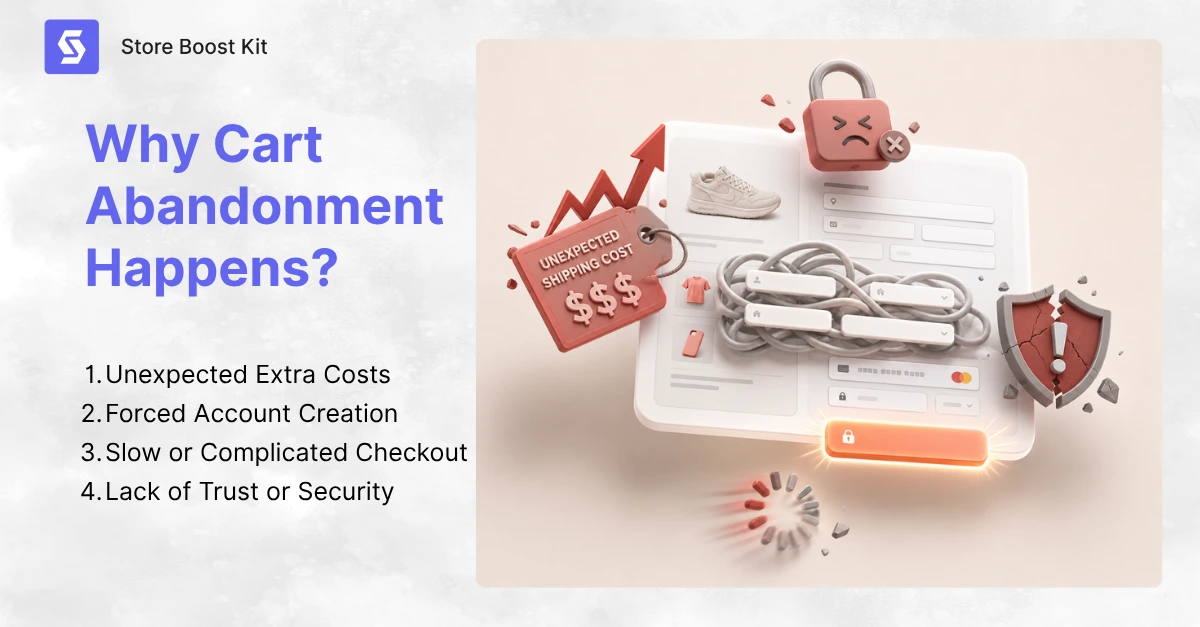
Shoppers abandon carts for a handful of predictable reasons, and if you fix these, you’ll reduce cart abandonment faster than any single tactic alone.
Let’s see the common reasons for cart abandonment:
Unexpected Extra Costs
Research shows that nearly half of all cart abandonments occur due to surprise costs. Costs like taxes or shipping fees that pop up only at checkout. Thus, shoppers feel tricked, so they bail, and you lose the revenue.
The fix is simple. Be upfront, show shipping costs on the product page, and mention taxes early. Honesty builds trust before checkout even starts. It’s one of the best ways to decrease cart abandonment.
Forced Account Creation Increases Cart Abandonment
About 26% of shoppers abandon when you force them to create an account before buying. They came to buy a product, not join a club. So, give them a guest checkout option instead. You can always invite account creation on the thank-you page after the sale is done.
By then, the shopper is happy and relaxed, and a simple “Save your details for next time?” or a warm review follow-up feels helpful instead of pushy.
Slow or Complicated Checkout
A slow or complicated checkout costs 22% of possible sales. Every extra form field is a reason to leave, and every slow-loading page pushes shoppers toward the back button. Simplify your checkout to just name, address, and payment.
Remove any field that is not legally or logistically necessary. Speed is not a luxury in e-commerce. It is a must, and it’s one of the clearest ways to reduce cart abandonment without spending a single dollar.
Lack of Trust or Security Leads to Cart Abandonments
About 18% of shoppers leave because they do not trust the site with their payment information. This is especially true for newer stores.
Start with an SSL certificate. This is non-negotiable. An SSL certificate encrypts your customer data and shows the padlock icon in the browser bar. Without it, modern browsers will flag your site as Not Secure, and most shoppers will leave before they even reach checkout. Beyond SSL, show security badges, customer reviews, and a clear return policy near the Pay Now button. Use trusted payment gateways like Stripe or PayPal that shoppers already recognize.
All these reasons are fixable. Surprise costs, forced signups, delayed forms, and missed trust signals are friction points you manage. Removing them one by one helps buyers say yes. Reducing cart abandonment starts with that and takes minimal time and care.
12 Proven Ways to Reduce Cart Abandonment in WooCommerce
Even when you fix your checkout, some shoppers will still leave. Life gets in the way. They get distracted, their phone dies, or they want to sleep on it. That doesn’t mean the sale is gone forever. With the right cart recovery system in place, you can bring many of those shoppers back.
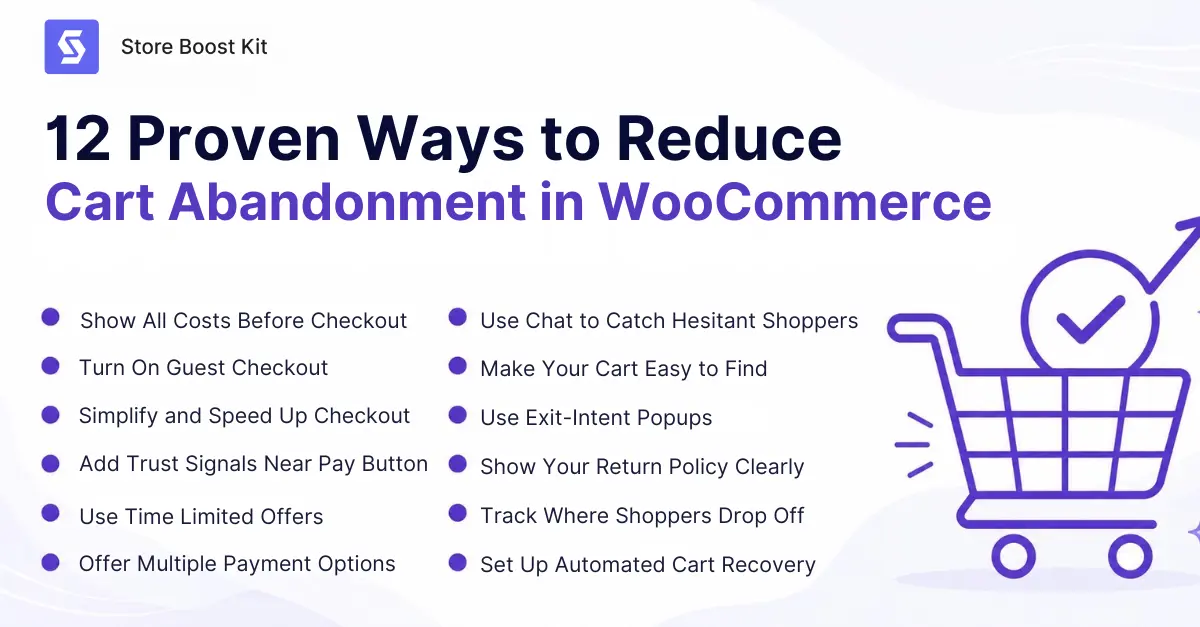
So, here are 12 easy ways to reduce shopping cart abandonment and recover lost sales in WooCommerce:
1. Show All Costs Before Checkout Begins
Transparency is one of the most powerful ways to reduce cart abandonment in your WooCommerce store. When shoppers see a price jump at the final step, trust breaks instantly, and they leave.
The fix is to show shipping costs on the product page itself, not just in the shopping cart. Mention taxes early so nothing comes as a surprise. If you can offer free shipping above a certain order value, display that prominently on your homepage and product pages. Shoppers will actually increase their cart size to qualify for it.
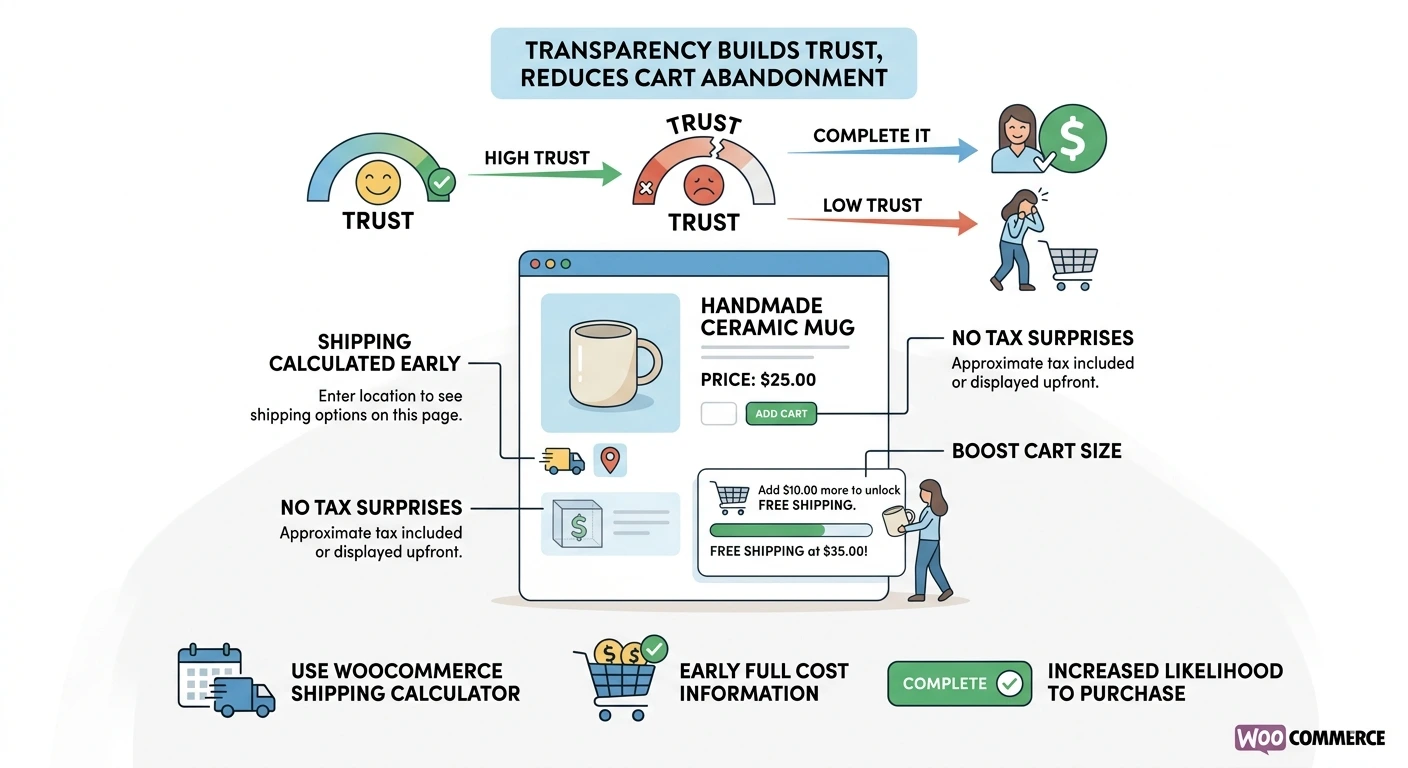
WooCommerce lets you add a shipping calculator directly to the cart page. Use it. The sooner your customers know the full cost, the more likely they are to follow through. This is one of the simplest reduce cart abandonment optimized checkout strategies you can apply today.
2. Turn On Guest Checkout to Reduce Cart Abandonment
If you are forcing shoppers to create an account before they can buy, you are turning away more than a quarter of your potential customers. Guest checkout removes that barrier completely.
In WooCommerce, enabling guest checkout takes about thirty seconds. Go to WooCommerce, then Settings, then Accounts and Privacy, and check the guest checkout box. That one change can have an immediate impact on your conversion rate.
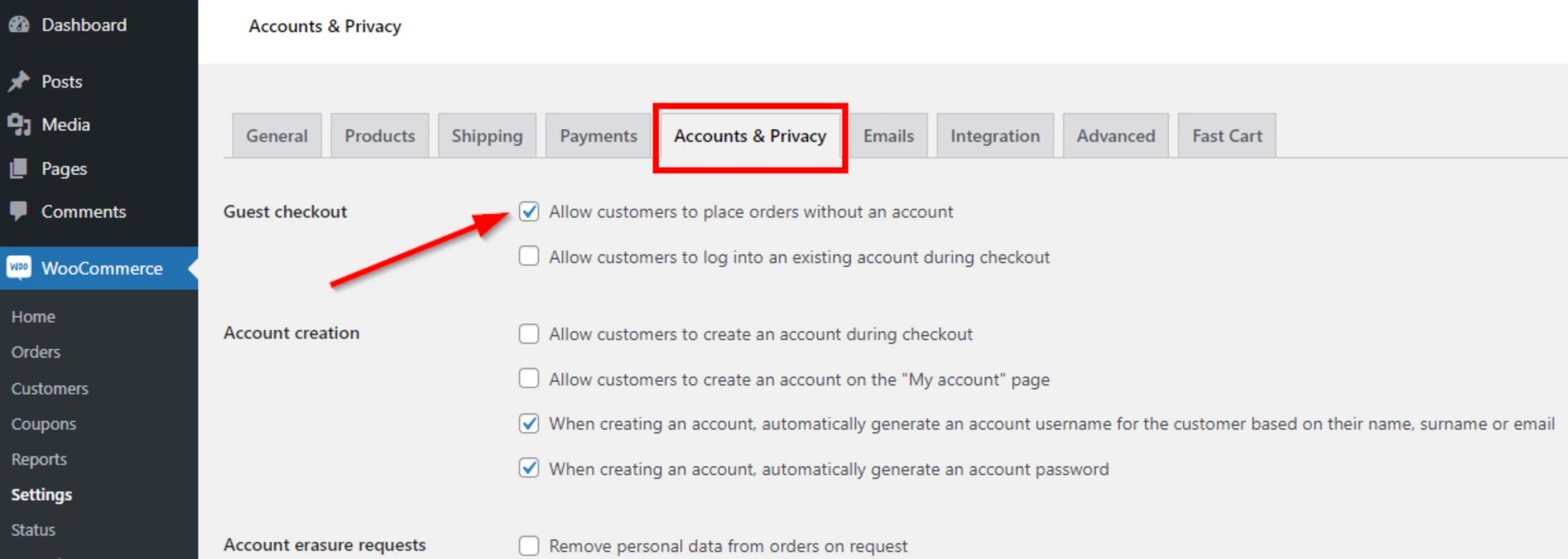
After the purchase is complete, you can invite shoppers to create an account on the thank-you page. By that point, they are happy, the sale is done, and a friendly prompt like “Save your details for next time?” feels helpful rather than pushy.
It is a much better way to build your customer list while keeping your checkout frictionless. And if you want to go further, the StoreBoostKit plugin can recover guest checkouts too, capturing emails before a guest ever leaves, so you can still follow up.
3. Simplify and Speed Up Your Checkout Process
A complicated checkout is one of the top reasons shoppers abandon carts. Every extra field, every unnecessary page, and every second of loading time is another opportunity for someone to give up and leave. Start by auditing your checkout form. Remove any field that is not required for shipping or payment. Ask yourself whether you really need a phone number, a company name, or a second address line. If you do not absolutely need it, cut it.
Next, look at your checkout page count. If shoppers have to click through three or more pages to complete a purchase, you are losing people at every step. A single-page checkout or a two-step process keeps the operation moving. Speed is not optional in eCommerce. It is one of the clearest reduce cart abandonment optimized checkout strategies you can apply without spending any money.
4. Re-Engage Lost Shoppers with Retargeting Ads
If a customer abandons a shopping cart, you should re-engage with them since that’s not a lost sale, that’s a sale on hold. Retargeting ads and push notifications can bring them back in no time. Set up tools like Facebook Pixel, and anonymously track abandoners and serve them tailored ads that highlight the exact products they left behind. Play with their mental map. The ROI is often higher with retargeting ad campaigns because you are targeting leads who already have an interest in buying.
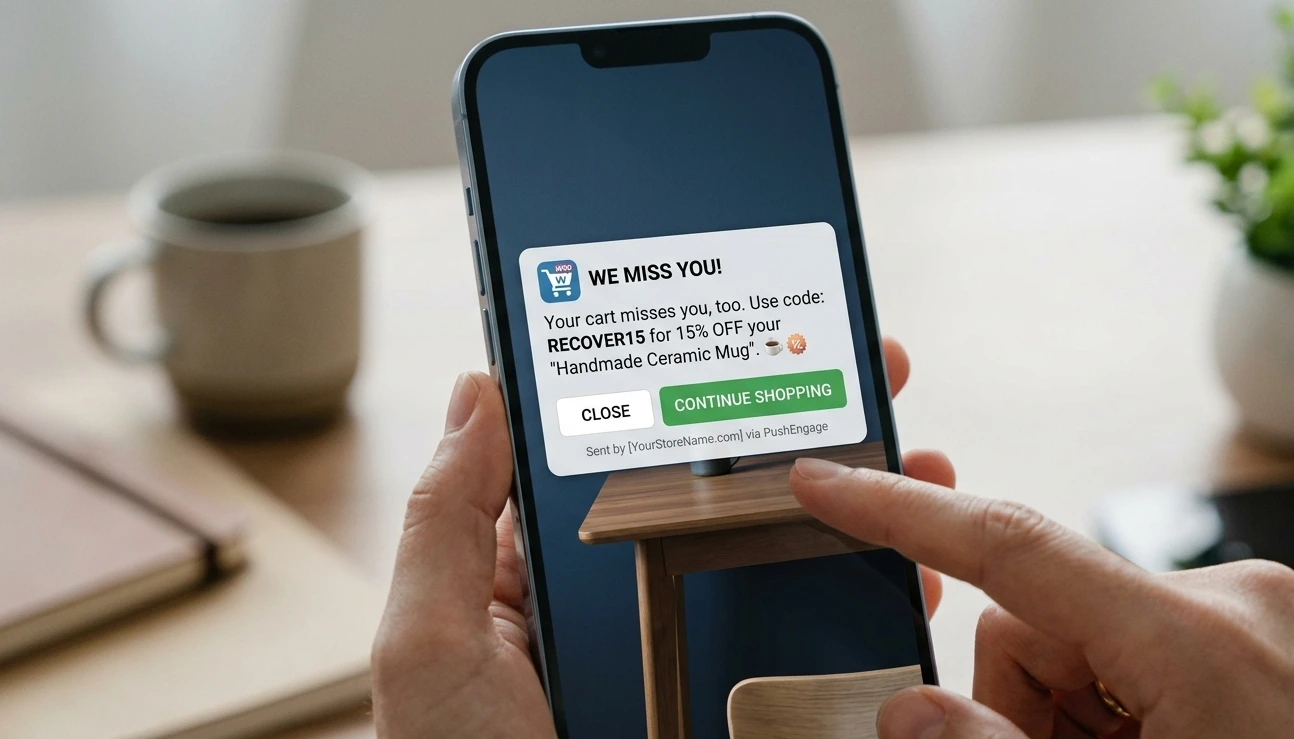
For a more direct approach, consider web push notifications using tools like PushEngage. These allow you to send personalized reminders or special offers directly to a customer’s browser, even after they’ve left your site. Whether through social media ads or browser alerts, staying top-of-mind is a proven way to recover “lost” revenue and turn browsers into buyers.
5. Use Time-Limited Offers to Create Urgency
Shoppers who feel like they have unlimited time to decide will often walk away and never return. A time-limited offer gives them a reason to act now instead of later. You can add a countdown timer to a sale price, a limited stock notice on a product page, or a special discount that expires within 24 hours. You do not need to use every tactic at once. Even one well-placed urgency signal can reduce cart abandonment by pushing hesitant shoppers off the fence.
Combine urgency with scarcity for even better results. When a shopper sees that a product is on sale and only three units are left, the motivation to complete the purchase becomes much stronger. Just be honest about it. Fake scarcity destroys trust faster than any friction point ever could.
6. Offer Multiple Payment & Shipping Options to Recover Abandoned Carts
One of the most overlooked ways to reduce cart abandonment is simply giving shoppers more ways to pay. If a customer reaches the payment step and does not see a method they trust or use regularly, they will leave. Credit and debit cards are the obvious starting point. But you should also offer PayPal, Google Pay, Apple Pay, and any regional payment method popular with your specific audience. WooCommerce makes it straightforward to add multiple payment gateways through its extensions library.
The same idea applies to shipping. More carrier options mean shoppers can find a rate and timeline that works for them. Some customers will pay more for faster delivery. Others want the cheapest option available.
Using the right shopping cart abandonment tools alongside flexible payment and shipping options is one of the most reliable ways to decrease cart abandonment when you give shoppers the flexibility they need.
7. Reduce Cart Abandonment Using Chat Strategies
You can reduce shopping cart abandonment using chat strategies that catch hesitant shoppers before they leave. When someone spends more than 60 seconds on the checkout page, that’s a signal that either they are stuck or uncertain. A proactive chat message like “Need help finishing your order?” can save that sale.
If you do not have a live agent available around the clock, a chatbot works just as well. Modern chatbots can answer common questions about shipping, returns, and payment automatically. That means shoppers get the information they need and keep moving instead of abandoning their cart to go search for answers elsewhere.
Reducing cart abandonment through chat is one of the most direct strategies you can use because you are addressing shopper doubt in real time. If you have not tried this yet, start small with a chatbot on your checkout page and see how many shoppers you save. It is one of the clearest examples of how to reduce shopping cart abandonment using chat strategies that require almost no extra effort once they are set up.
8. Make Your Cart Easy to Find
Last month, I had to give up on purchasing a hoodie from an online store. The reason? I couldn’t find the cart while shopping from my mobile. This one surprises a lot of store owners, but some shoppers like myself abandon carts simply because we cannot find them again. If your cart icon is small, hidden, or placed somewhere unexpected, shoppers can lose their items and move on.
Put the cart icon in the top right corner of your site. That is where every shopper expects it to be. Make it visible on every page, not just the homepage or product pages. Consider adding a floating cart widget that appears at the bottom of the screen so your customers can see their cart total at any point in their visit.
A pop-up cart is another great option. When a shopper adds an item, a small pop-up appears showing what is in their cart and offering a direct path to checkout. The fewer steps between browsing and buying, the more you reduce cart abandonment from simple confusion.
9. Use Exit-Intent Popups to Reduce Cart Abandonment
Make an exit-intent pop-up appear right when a shopper moves to leave the page. A good pop-up either reminds them what is in their cart or offers a small incentive like 10% off or free shipping to finish the purchase right now. Reports show exit-intent popups can recover between 3% and 8% of abandoned carts, which adds up fast on a busy store. Keep the pop-up focused with one clear message and one button. Showing it too early feels annoying. Showing it at the right moment feels helpful.
A well-designed Cart Abandonment Popup can also capture an email address, show a countdown timer, or highlight your return policy, making it one of the most effective abandonment recovery tools in your store. We cover exactly how to build one in our next guide on how to create a WooCommerce Cart Abandonment Popup.
10. Show Your Return Policy Clearly
A clear and easy-to-find return policy removes one of the most common final doubts shoppers have before completing a purchase. When someone isn’t sure whether they can return a product if it doesn’t work out, they often choose not to buy at all.
Create a dedicated return policy page and link to it from your checkout page, your footer, and near your pay button. Answer the frequently asked questions directly. Which products can be returned? How long does the return window last? Who covers the shipping cost? How quickly does the refund arrive?
Keep the language simple and friendly. A confident return policy tells shoppers you stand behind what you sell. That trust is one of the easiest ways to reduce cart abandonment at the final decision stage.
11. Track Where Shoppers Drop Off to Reduce Cart Abandonment
You cannot fix what you cannot see. Understanding cart abandonment behavior signals in e-commerce is one of the most valuable things you can do for your store. These signals tell you exactly where shoppers leave, so you can fix the right problem instead of guessing.
Some shoppers drop off when they see the shipping cost. Others leave on the payment page. Some abandon right after the cart page, before they even reach checkout. Each of these drop-off points points to a different problem and a different fix.
Use Google Analytics with WooCommerce eCommerce tracking enabled. You can also use the built-in analytics dashboard inside a good cart recovery plugin to see cart value, recovery rates, and exactly where shoppers exit most often. Good shopping cart abandonment tools give you this data clearly, so you are not flying blind. When you combine that visibility with the right abandonment recovery tools, you can prioritize your improvements and measure whether they are actually working.
12. Set Up Automated Cart Recovery and Win Back Lost Sales
Even if your checkout is perfect, some customers may depart. Life interferes. They get distracted, their phone dies, or they want to think about it overnight. This does not imply the sale is over. Scale-based cart abandonment reduction requires automated cart recovery. Setting up a recovery strategy that automatically gets shoppers back lets you focus on other elements of your business instead of chasing them manually.
- Email a recovery message within 60 minutes of the consumer departing. When they still remember your store. Provide product image, name, and price, and link to their cart.
- Send a second email at 24 hours and a third at 48–72 hours. Second, mention your return policy or customer reviews. Offer free delivery or a discount voucher on the third. Three emails can recover 69% more orders than one.
- Retargeting advertising and exit intent popups can remind shoppers when they visit other sites and dismiss the tab, beyond email. A well-timed 10% discount pop-up can recover 3%–8% of abandoned carts.
- Also, make sure you capture the email address at the very start of checkout so you can follow up even with shoppers who never finished creating an account.
The key to making all of this work without burning yourself out is automation. Manual follow-ups fall apart the moment your store gets busy. A dedicated cart recovery plugin handles the timing, the messaging, and the tracking for you automatically. You set it up once, and it keeps working whether you are having a quiet day or a hectic one.
How to Reduce Cart Abandonment on Mobile
More than 60% of e-commerce traffic now comes from mobile devices. Among them, 80% leave without confirming the purchase. So if your mobile checkout experience is an afterthought, you’re bleeding sales. Here’s how to reduce cart abandonment on mobile:
- Speed Optimization: Start with speed because mobile users are impatient. If your checkout takes more than a few seconds to load, they’re gone. Compress images, use a lightweight theme, and test your mobile checkout on real devices instead of just your desktop browser.
- Design for Thumbs: Buttons should be large enough to tap without zooming, and forms should use the right keyboard types for each field. Numbers for phone fields, email symbols for email fields. Small details make a big difference.
- Simplify Payment: Mobile wallets like Apple Pay and Google Pay reduce typing and speed up the whole process. The less friction on a small screen, the more sales you’ll close.
- Add Security Signals: Don’t forget about trust signals that e-commerce shoppers look for on mobile as well. Adding security badges, clear return policies, and visible contact info matters even more when someone is buying from a five-inch screen.
Bonus Tips: Here’s something many store owners miss. Your mobile checkout might look fine on your iPhone 15 Pro, but what about a three-year-old Android with a cracked screen? Test on older devices. Test with one hand while holding coffee. If a thumb can’t reach the “Place Order” button comfortably, fix it.
Mobile checkout experience isn’t about looking pretty. It’s about working effortlessly in real life.
How to Reduce Cart Abandonment with Checkout Optimization Strategies
You can increase conversions by up to 35% just by simplifying your checkout. That’s not a small lift. It’s the difference between a struggling store and a growing one. Let’s see how to recover sales by optimizing your checkout strategies:
- Provide clarity upfront: Each checkout stage should clearly indicate where the shopper is and what’s next. Avoid guessing, use a progress indicator, and label buttons.
- Guest Checkout: Allow guest checkout in your WooCommerce store. We covered this earlier, but it’s worth repeating because guest checkout increases completion rates significantly. Whether they create an account or not, shoppers will buy immediately, which is what matters.
- Optimize your checkout form: Remove unnecessary form fields, auto-fill address boxes, and utilize a single-page checkout if your theme enables it. The fewer clicks between “add to cart” and “order confirmed,” the better. Every extra step gives shoppers time to consider “Do I really need this?” or “Should I check Amazon first?” You want them to buy before those thoughts win. A three-step checkout may look organized, but a busy consumer sees it as three chances to quit.
Above all, be transparent about delivery times and costs before checkout begins. What is checkout abandonment differs slightly from cart abandonment, but the fix is the same. Remove surprises, and you’ll keep more shoppers through to the end.
One store I worked with added a delivery estimate right on the product page, and changed nothing else. Their abandonment rate dropped 8% in two weeks because shoppers just wanted to know when their item would arrive. That’s ecommerce checkout optimization in its simplest form.
Why StoreBoostKit Is Built for WooCommerce Growth
Store Boost Kit builds tools that feel native to WooCommerce with no clunky dashboards and no monthly SaaS dependency. Just plugins that install directly into your store and start working.
The Recover Abandoned Cart for WooCommerce plugin is designed for store owners who want results without complexity. Setup takes minutes instead of days, emails are sent automatically, and you can track recovered revenue right inside your WooCommerce reports.
Unlike external SaaS tools, Store Boost Kit keeps your data in your store. You own it, you control it, and you don’t pay recurring fees for features you could have built in.
StoreBoostKit also offers other tools to grow your WooCommerce store. The Product Expiry Manager for WooCommerce helps you manage time-sensitive inventory, and the Review Follow Up for WooCommerce automates post-purchase review requests to build social proof. Together, these tools create a smoother customer journey from browse to buy to review.
Many SaaS cart recovery tools charge $50 or more per month, which is a real burden for a small store. StoreBoostKit’s plugin model means you pay once and use it forever. Your data stays on your server, your customer list stays private, and if you ever want to customize something, you have full access because it’s built for WooCommerce instead of bolted onto it.
Best Practices Checklist to Reduce Cart Abandonment in 2026
Here’s a quick checklist to reduce cart abandonment starting today:
- Show all costs upfront, including shipping and taxes
- Offer guest checkout on every product
- Simplify your checkout to the fewest fields possible
- Add trust badges and security seals near payment fields
- Optimize your mobile checkout for speed and thumb-friendly design
- Send the first recovery email within one hour
- Use SMS as a second recovery channel
- Set up retargeting ads with a reasonable frequency cap
- Install a WooCommerce abandoned cart plugin for automation
- Track your cart abandonment rate weekly and test improvements
Print this out, tape it to your monitor, and work through it one item at a time.
Frequently Asked Questions (FAQs)
Q: Why is cart abandonment so high?
A: Cart abandonment is high because online shoppers face more friction than in-store buyers. They cannot touch the product, they worry about hidden costs, and they can leave without embarrassment. With an average rate over 70%, it is a universal challenge, but it is also a universal opportunity for stores that fix the right problems.
Q: What is a good cart abandonment rate?
A: A good cart abandonment rate is below 60%. The industry average sits between 69% and 71%, so if you are above 70%, you have clear room to improve. If you are below 60%, you are doing better than most stores, but even then, a recovery system will bring back sales you would otherwise lose forever.
Q: How do I recover abandoned carts in WooCommerce?
A: You recover abandoned carts in WooCommerce by combining checkout fixes with automated follow-up. Install a recovery plugin like Recover Abandoned Cart for WooCommerce, set up email sequences, capture guest emails early in the checkout flow, and send your first reminder within one hour of abandonment. A multi-channel approach that includes email and retargeting ads brings back the most shoppers.
Q: What are the best ways to reduce cart abandonment?
A: The best ways to reduce cart abandonment are transparency, simplicity, and speed. Show all costs early, offer guest checkout, simplify your forms, speed up mobile loading, and follow up automatically when someone still leaves. Prevention and recovery work best together, and using both is how you get the biggest results.
Q: How do I fix cart abandonment in WooCommerce?
A: Start by auditing your checkout for friction points like hidden fees, forced account creation, and slow loading. Then install a recovery plugin to catch the shoppers you could not save at checkout. Track your results, test one change at a time, and keep improving. Consistent attention to cart abandonment is what separates growing stores from stagnant ones.
Q: Does StoreBoostKit work for guest shoppers?
A: Yes. The Recover Abandoned Cart plugin by StoreBoostKit uses exit intent popups to capture guest email addresses before shoppers leave. That means you can follow up even with shoppers who never created an account, which is where most cart recovery tools fall short.
Conclusion
You now know exactly how to reduce cart abandonment from every angle. You understand why shoppers leave, you know how to fix your checkout experience, and you have a full recovery system ready to set up.
The average cart abandonment rate is over 70%. That sounds alarming, but it also means your competitors are losing the same sales. The stores that act on this, the ones that simplify checkout and set up smart recovery sequences, are the ones that grow while everyone else keeps wondering why their traffic does not convert.
Every abandoned cart is a conversation you have not finished yet. Fix the friction, send the follow-up, and turn those almost-sales into real revenue.
Ready to stop losing sales to abandoned carts? Set up your abandoned shopping cart recovery system with StoreBoostKit and start bringing shoppers back automatically.
