

Checkout abandonment is the silent revenue killer most WooCommerce store owners never see coming. A shopper adds products to their cart. They click “Proceed to Checkout.” They enter their email and shipping details. Then they vanish. No payment. No sale. Just a lost customer who was one click away from buying.
Table of Contents
- What is Checkout Abandonment?
- Checkout Abandonment vs. Cart Abandonment
- Checkout Abandonment and the E-commerce Funnel
- Checkout Abandonment Rate: The Numbers
- What Causes Checkout Abandonment in WooCommerce?
- How to Calculate Your Checkout Abandonment Rate
- How to Fix Checkout Abandonment in WooCommerce
- How to Recover Abandoned Checkouts in WooCommerce
- What We Have Seen After Optimizing WooCommerce Checkouts
- Other Ways to Protect Revenue in Your Store
- Checkout Abandonment Checklist
- Frequently Asked Questions
- Conclusion
This guide breaks down exactly what checkout abandonment is, how it differs from cart abandonment, and what you can do to stop it. If you already know about cart abandonment, think of this as the next layer down. These shoppers got closer to buying. That makes them more valuable.
And more recoverable. If you want to win back those lost sales automatically, abandoned shopping cart recovery is the fastest way to do it.
What is Checkout Abandonment?
Checkout abandonment happens when a shopper starts the checkout process but leaves before completing the purchase. They have already entered personal information like their email address or shipping details. But they never finish the payment step.
This is different from cart abandonment. Cart abandonment happens when someone adds items to their cart but never clicks the checkout button. Checkout abandonment happens after that click. The shopper showed real intent to buy. They were inside your checkout flow. Then something stopped them.
Think of it like a physical store. Cart abandonment is like someone putting items in their basket and leaving the store. Checkout abandonment is like someone walking to the register, placing items on the counter, and walking out before paying. The second one hurts more because they were so close.
In 2026, the average cart abandonment rate across all e-commerce stores sits at 70.22%. But the checkout-stage abandonment rate, the percentage of people who start checkout but do not finish, is roughly 40-45% of all initiated checkouts. That means nearly half of the shoppers who enter your checkout will leave without paying.
Checkout Abandonment vs. Cart Abandonment
Checkout abandonment and cart abandonment are not the same thing. Cart abandonment happens earlier in the buying journey. Checkout abandonment happens later. And that difference matters for how you fix the problem.
Here is the simplest way to separate them:
| What Happened | Cart Abandonment | Checkout Abandonment |
| Stage | After “Add to Cart” | After “Proceed to Checkout” |
| Intent Level | Medium. They liked the product. | High. They started giving you personal data. |
| Email Captured? | Usually no. | Usually yes. |
| Main Causes | Browsing, comparison shopping, not ready to buy | Shipping shock, payment friction, forced accounts |
| Recovery Difficulty | Harder. You may not have their contact info. | Easier. You have their email from checkout. |
Cart abandonment is often about interest. The shopper was curious but not committed. Checkout abandonment is about friction. The shopper was committed but hit a wall.
For example, imagine someone adds a pair of shoes to their cart and leaves. They might have been window shopping. But if they enter their email, fill out their address, and then leave, they wanted those shoes. Something specific stopped them. Maybe the shipping cost surprised them. Maybe the checkout form felt too long. Maybe their preferred payment method was missing.
That is why checkout abandonment deserves its own strategy. You cannot fix it with the same tactics you use for cart abandonment.
Checkout Abandonment and the E-commerce Funnel
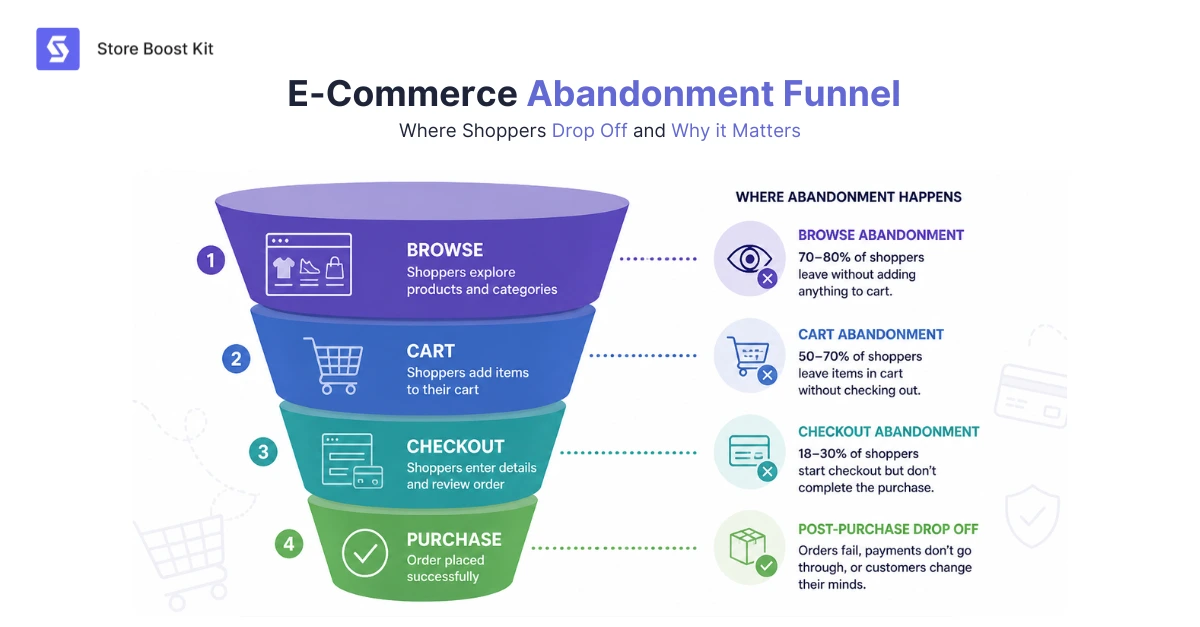
Checkout abandonment sits at the very bottom of your ecommerce funnel. It is the final leak before money hits your account. To understand it, you need to see where it fits in the full buyer journey.
The e-commerce funnel has four main stages. First, awareness. The shopper discovers your store. Second, interest. They browse products and read descriptions. Third, intent. They add items to their cart and start checkout. Fourth, purchase. They complete the payment.
Checkout abandonment happens between stage three and stage four. The shopper has moved past browsing. They have moved past cart consideration. They are at the final step. Then they drop off.
This matters for conversion rate optimization. Every stage above checkout feeds into it. If your product pages are slow, fewer people reach checkout. If your cart page is confusing, fewer people start checkout. But once someone enters checkout, the problem shifts from attraction to friction.
Checkout UX becomes the deciding factor at this stage. The shopper already wants the product. Now they need a smooth experience to complete the purchase. Any friction point in your checkout flow acts as a barrier. And barriers at the bottom of the funnel cost you the most because you already invested in getting that shopper there.
Understanding the e-commerce funnel helps you prioritize fixes. A checkout abandonment problem is almost always a checkout experience problem. Not a product problem. Not a traffic problem. A final-mile problem.
Checkout Abandonment Rate: The Numbers
The checkout abandonment rate tells you what percentage of shoppers who start checkout never finish. In 2026, roughly 40-45% of all initiated checkouts end in abandonment. That is nearly half of your highest-intent shoppers walking away.
Here are the numbers that matter most.
The global cart abandonment rate is 70.22%. That includes everyone who adds to the cart and leaves, whether they started checkout or not. But within that group, the people who actually start checkout are your best leads. They entered their information. They were ready to pay. Losing them costs more than losing a casual browser.
Mobile checkout abandonment is even worse. Mobile cart abandonment rates reach 80.02% compared to 66.41% on desktop. For WooCommerce stores specifically, mobile abandonment can climb as high as 85.65%. Since over 60% of e-commerce traffic now comes from mobile devices, this gap is bleeding revenue.
The financial impact is massive. E-commerce stores lose approximately $18 billion annually to cart and checkout abandonment combined. Baymard Institute estimates that $260 billion in lost orders across the US and EU is recoverable through better checkout design and recovery strategies.
If your checkout abandonment rate is above 45%, you have a problem worth fixing immediately.
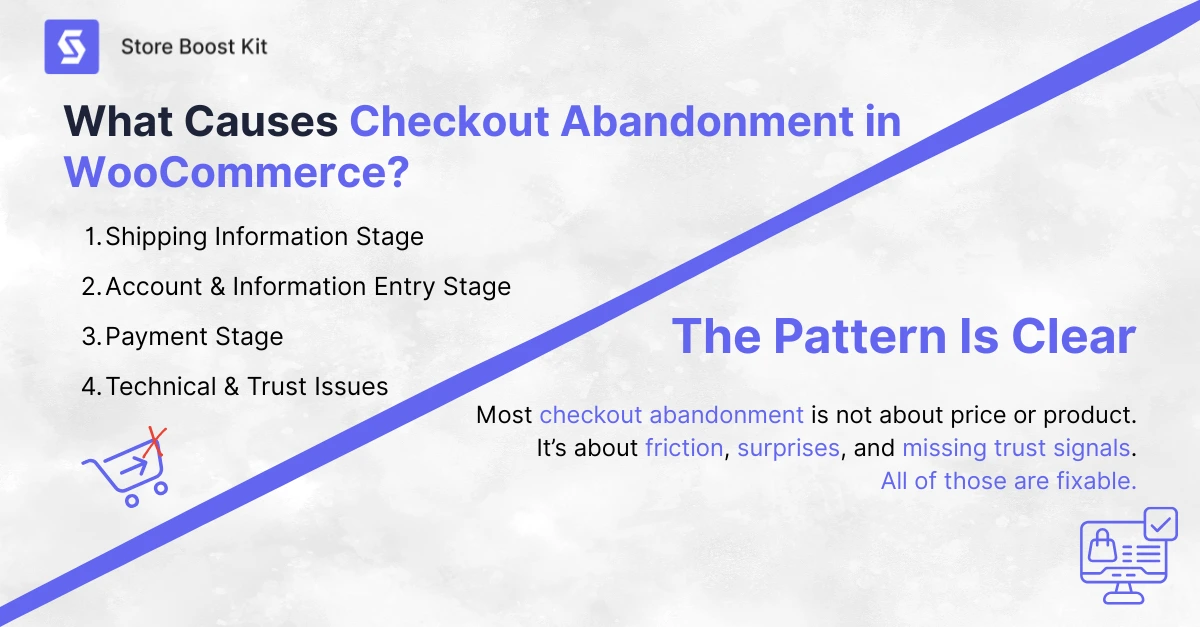
What Causes Checkout Abandonment in WooCommerce?
Shoppers abandon at checkout for specific, fixable reasons. The Baymard Institute surveyed thousands of online buyers and found the same problems year after year.
Here is what stops people from finishing their purchase, broken down by where it happens in your checkout flow:
Checkout Abandonment at the Shipping Information Stage
48% of shoppers abandon because extra costs like shipping and taxes appear too late. They see a product for $50. They get to checkout, and the total is $67. That surprise kills the sale.
21% could not see the total cost upfront. They had to start checkout just to find out what they would actually pay.
23% left because the delivery was too slow. They wanted the item soon. Your shipping timeline did not match their expectation.
Account and Information Entry Stage
26% abandoned because the site forced them to create an account. They wanted to buy quickly. You made them fill out a registration form first. 22% said the checkout process was too long or complicated. Too many form fields. Too many steps. Too much effort.
34% of mobile shoppers struggle with small-screen form input. Typing on a phone is hard. Every extra field increases the chance they quit.
Checkout Abandonment at Payment Stage
13% did not see their preferred payment method. They wanted to pay with PayPal, Apple Pay, or a buy-now-pay-later option. You only offered credit cards. 25% did not trust the site with their credit card information. No trust badges. No SSL visible. No security signals.
9% had their credit card declined. This one is partly outside your control, but offering alternative payment methods helps.
Technical and Trust Issues
17% shoppers left because the website crashed or had errors during checkout. A broken page at the final step is a guaranteed lost sale. 18% were unhappy with the return policy. They wanted reassurance that they could return the item if needed. Your policy looked too strict.
The pattern is clear. Most checkout abandonment is not about price or product. It is about friction, surprises, and missing trust signals. All of those are fixable.
How to Calculate Your Checkout Abandonment Rate
Your checkout abandonment rate shows exactly how many shoppers start checkout but do not pay. Here is the formula.
Checkout Abandonment Rate = (1 – Completed Transactions / Initiated Checkouts) x 100
Or you can calculate it this way.
Checkout Abandonment Rate = Abandoned Checkouts / Total Initiated Checkouts x 100
Here is a real example. If 1,000 shoppers start checkout on your WooCommerce store this month, and 550 complete their purchase, your math looks like this.
(1 – 550 / 1,000) x 100 = 45%
That means 45% of the people who started checkout left without buying. That is above the benchmark. You should aim to get this number below 40%.
In WooCommerce, you can find your initiated checkout data in your WooCommerce Analytics dashboard under the Orders section. You can also set up a funnel in Google Analytics 4 to track how many users reach each checkout step and where they drop off.
Track this number monthly. Small improvements add up fast. A drop from 45% to 35% checkout abandonment can mean thousands of dollars in recovered revenue.
How to Fix Checkout Abandonment in WooCommerce
You can cut your checkout abandonment rate by removing friction before it happens. These fixes address the exact problems that drive shoppers away.
Show All Costs Early
48% of shoppers leave because of surprise costs at checkout. Put your shipping calculator on the product page. Show the total price including tax before they click “Proceed to Checkout.” If you offer free shipping above a certain amount, display that threshold clearly on every page.
Enable Guest Checkout
26% of shoppers abandon when forced to create an account. In WooCommerce, go to WooCommerce, then Settings, then Accounts and Privacy. Check the box that allows customers to place orders without an account. Guest checkout can increase conversions by up to 45%.
Cut Your Form Fields
The average checkout flow has 5 steps and 11 form elements. That is too many. Reduce your checkout form to 7 or 8 fields maximum. Remove anything you do not absolutely need. Do not ask for the same information twice.
Add Trust Badges
25% of shoppers worry about security. Add SSL certificates, payment provider logos, and money-back guarantee badges directly on your checkout page. Trust badges can increase conversions by up to 42%.
Offer Multiple Payment Methods
13% abandon because their preferred payment method is missing. Add digital wallets like Apple Pay, Google Pay, and PayPal. Offer buy-now-pay-later options like Klarna for orders over $100. Stores that add one-tap mobile payments see a 35% reduction in mobile abandonment.
Speed Up Your Mobile Checkout
Mobile checkout abandonment is 12 percentage points higher than desktop. Use large, thumb-friendly buttons. Enable autofill for address fields. Make sure your checkout page loads in under 3 seconds. Every extra second of load time increases abandonment.
Add a Progress Indicator
If your checkout has multiple steps, show shoppers exactly where they are. A simple progress bar reduces anxiety and keeps people moving forward.
These fixes prevent abandonment. But even a perfect checkout will still lose some shoppers. That is where recovery comes in.
How to Recover Abandoned Checkouts in WooCommerce
Recovery turns lost sales into revenue. And checkout abandonment is the easiest type to recover because you usually have the shopper’s email.
The most effective tool is a timed email sequence. Send a friendly reminder within one hour. Send a social-proof email after 24 hours. Send a final nudge with a small incentive after 48 to 72 hours. This sequence typically recovers 5-15% of abandoned checkouts.
But setting this up manually in WooCommerce is difficult. You need to capture emails, trigger sequences, personalize messages, and track results. Doing it without a tool takes hours and usually breaks.
That is where abandoned shopping cart recovery comes in. Our plugin, Recover Abandoned Cart for WooCommerce, handles the entire sequence automatically. It captures emails at checkout. It sends timed recovery emails. It tracks every dollar recovered. All inside your WordPress dashboard. No coding needed.
What We Have Seen After Optimizing WooCommerce Checkouts
We have worked with hundreds of WooCommerce stores over the years. And the same patterns show up again and again. Here is what we have learned from actually fixing checkout abandonment, not just reading about it.
The biggest mistake is hiding shipping costs. Stores that show shipping on the product page see checkout abandonment rates 15-20% lower than stores that wait until checkout. It is the single highest-impact fix you can make.
Guest checkout is non-negotiable. Every store we have seen force account creation has a checkout abandonment rate above 50%. Every store that enables guest checkout drops below 45% within a month. The data is consistent.
One-page checkout beats multi-step for most stores. But not all. High-consideration purchases with $200+ average order values sometimes convert better with a two-step checkout because it feels more secure. Test both. WooCommerce Checkout Blocks make this easy to try.
The choice of payment gateway matters more than most owners think. Stores that only accept credit card payments have higher checkout abandonment rates than stores that offer PayPal, Stripe, Apple Pay, and buy-now-pay-later options. Shoppers trust what they know.
Abandoned checkout emails recover 5-15% of lost sales. But timing is everything. Send the first email within one hour. Wait longer, and recovery drops by half. This is why automation matters. Manual email sequences always slip.
The 40% benchmark is real. Stores below 40% checkout abandonment are doing well. Stores above 50% have a broken checkout flow. Most stores sit between 42% and 48%. That middle ground is where small fixes create big revenue jumps.
These are not theories. These are results we see repeatedly. Checkout abandonment is fixable when you know what to look for.
Other Ways to Protect Revenue in Your Store
Checkout abandonment is not the only leak in your revenue funnel. Smart store owners fix multiple problems at once. Here are three other tools from StoreBoostKit that help you capture sales you would otherwise lose.
Restock Alerts for WooCommerce
Shoppers often abandon checkout because the item they want is out of stock. Instead of losing them forever, let them sign up for a back-in-stock alert. When your inventory updates, they get an email instantly. You turn a dead visit into a future sale.
If you sell products that frequently go out of stock, Restock Alerts for WooCommerce captures demand you would otherwise miss. It works on autopilot and integrates directly with your WooCommerce inventory.
Product Expiry Manager for WooCommerce
Some stores sell perishable goods, digital licenses, or subscription-based products with expiration dates. If a product expires and stays visible on your site, shoppers may add it to their cart, start checkout, and then hit a wall when the item is no longer valid. That creates a checkout abandonment scenario you could have prevented.
Product Expiry Manager for WooCommerce automatically hides or updates expired products. It keeps your catalog clean and prevents checkout frustration before it starts.
Review Follow-Up for WooCommerce
Social proof reduces checkout abandonment. When shoppers see real reviews from other buyers, they trust your store more. That trust pushes them through the final payment step.
But getting reviews is hard. Most customers forget to leave them. Review Follow-Up for WooCommerce sends automated review requests after delivery. You build a steady stream of fresh reviews that make future shoppers more confident at checkout.
Checkout Abandonment Checklist
Use this checklist to audit your WooCommerce store and plug the leaks in your checkout flow.
- Show shipping costs on the product page, not just at checkout
- Enable guest checkout in WooCommerce settings
- Reduce checkout form fields to 7 or fewer
- Add trust badges and security seals to your checkout page
- Offer at least 3 payment methods, including digital wallets
- Optimize your checkout for mobile with large buttons and fast load times
- Add a progress indicator for multi-step checkouts
- Set up automated recovery emails within 1 hour of abandonment
- Use abandoned shopping cart recovery to automate the entire recovery process
Tick these boxes, and you will see your checkout abandonment rate drop. The fixes are simple. The revenue impact is real.
Frequently Asked Questions
Q: What is checkout abandonment?
A: Checkout abandonment happens when a shopper starts the checkout process but leaves before paying. They have already entered information like their email or shipping address. But they never complete the purchase.
Q: What is a good checkout abandonment rate?
A: A good checkout abandonment rate is below 40%. In 2026, the average sits at 40-45% . If your rate is above 45%, you should fix your checkout flow immediately.
Q: How do I calculate my checkout abandonment rate?
A: Use this formula: (1 – Completed Transactions / Initiated Checkouts) x 100. You can find your data in WooCommerce Analytics or Google Analytics 4.
Q: Can I recover abandoned checkouts in WooCommerce?
A: Yes. The best way is through automated email sequences. Since shoppers who start checkout usually enter their email, you can send timed reminders to bring them back. Abandoned shopping cart recovery plugins make this automatic.
Q: When should I send abandoned checkout emails?
A: Send the first email within 1 hour. Send a second email after 24 hours. Send a final email with a small incentive after 48 to 72 hours. This sequence recovers the most sales.
Q: Should I offer a discount in my recovery emails?
A: Not in the first email. Many shoppers just got distracted. Save discounts for the third email as a last nudge. Leading with discounts trains customers to abandon on purpose.
Conclusion
Checkout abandonment is not the same as cart abandonment. It happens later in the buying journey. It involves shoppers with higher intent. And it is more recoverable because you usually have their email.
The causes are clear. Surprise shipping costs, forced account creation, long forms, missing payment methods, and trust issues drive shoppers away. Most of these are easy to fix.
Prevention stops the leak. Recovery catches what still slips through. Together, they protect revenue that would otherwise disappear.
If you are serious about recovering lost checkout sales, start with the checklist above. And if you want to automate the entire recovery process without writing a single line of code, check out abandoned shopping cart recovery with our Recover Abandoned Cart for WooCommerce plugin. It captures, emails, and recovers. All on autopilot.
Your shoppers were one click away from buying. Go get them back.
