


Shopify merchants can already sell directly through Google’s AI Mode and ChatGPT using the new Universal Commerce Protocol. Your WooCommerce store? It’s invisible to these AI shopping assistants, not because your products aren’t good enough, but because WooCommerce doesn’t support UCP yet.
Table of Contents
- The Competitive Gap WooCommerce Stores Face
- What “AI-Ready” Product Data Actually Means
- Audit Your Product Data Quality (45 minutes)
- Implement Complete Product Schema Markup (60 minutes)
- Add Product Identifiers AI Agents Trust (30 minutes)
- Create Machine-Readable Product Feeds (90 minutes)
- Make Inventory Data Accurate and Real-Time (45 minutes)
- Structure Product Variants Properly (30 minutes)
- Testing Your Data Quality (30 minutes)
- The “Buy-ability” Problem WooCommerce Needs to Solve
Google launched the Universal Commerce Protocol (UCP) on January 11, 2026 with Shopify as a co-development partner. Stores using Shopify can already complete transactions directly in AI conversations.
WooCommerce has no native support, there’s literally a feature request filed asking for it.
Here’s the reality: UCP requires what Search Engine Land calls “buy-ability”, systems that are queryable by AI agents, not just crawlable. WooCommerce needs engineering work to expose these capabilities.
But you can prepare your foundation now. UCP, Google Shopping, ChatGPT, and future AI systems all need the same underlying requirements: structured, machine-readable product data that’s complete, accurate, and up to date.
When WooCommerce plugin support arrives, you’ll be ready while your competitors scramble to catch up.
The Competitive Gap WooCommerce Stores Face
Shopify co-developed UCP with Google and launched with native support in January 2026. Shopify merchants can enable checkout directly in Google AI Mode, Gemini, and other AI surfaces using their existing Merchant Center accounts.
WooCommerce stores can’t do this. There’s no official plugin, no core integration, and no announced timeline.
A feature request filed on January 13, 2026 tells you everything, it doesn’t exist yet.
When someone asks ChatGPT or Google’s AI to find products, Shopify stores appear in results and complete transactions. WooCommerce stores might not show up, or they show up but can’t close the sale.
The gap isn’t just about having a protocol. According to Search Engine Land’s analysis, it’s about “buy-ability”, making your commerce system queryable by AI agents, not just crawlable.
Remember: You can’t control when WooCommerce releases UCP support. You CAN control whether your product data is ready when it arrives.
The underlying requirements aren’t new. It’s structured product data, the same foundations that make Google Shopping and AI queries work today.
What “AI-Ready” Product Data Actually Means
AI shopping systems need three things from your store: discovery capability, structured specifications, and transaction capability.
For discovery, AI agents query structured product data. When someone asks “find blue running shoes under $100,” the AI needs machine-readable product information to match that query.
For specifications, they need complete, accurate data: GTINs, brand identifiers, materials, variants, inventory status, shipping estimates. This is where most WooCommerce stores fall short.
For transactions, that’s where UCP enables checkout in AI conversations. WooCommerce can’t do this yet, it requires engineering work to expose “buy-ability” APIs.
Tip: Think of this as “AI SEO”, just like traditional SEO made your products findable in Google search, structured data makes them discoverable by AI agents.
But the first two layers work today. Google Merchant Center, comparison engines, voice assistants, and AI chatbots all use the same structured data formats.
Your WooCommerce theme probably includes basic Product schema, it’s just incomplete. You’re not starting from zero.
Audit Your Product Data Quality (45 minutes)
Start with diagnostics. According to industry guidance on AI readiness, ecommerce SEOs should be auditing product data for three critical areas: titles and descriptions, GTINs and SKUs, and inventory levels.
Use Google’s Rich Results Test on 5-10 product pages. This shows what structured data exists and what’s missing.
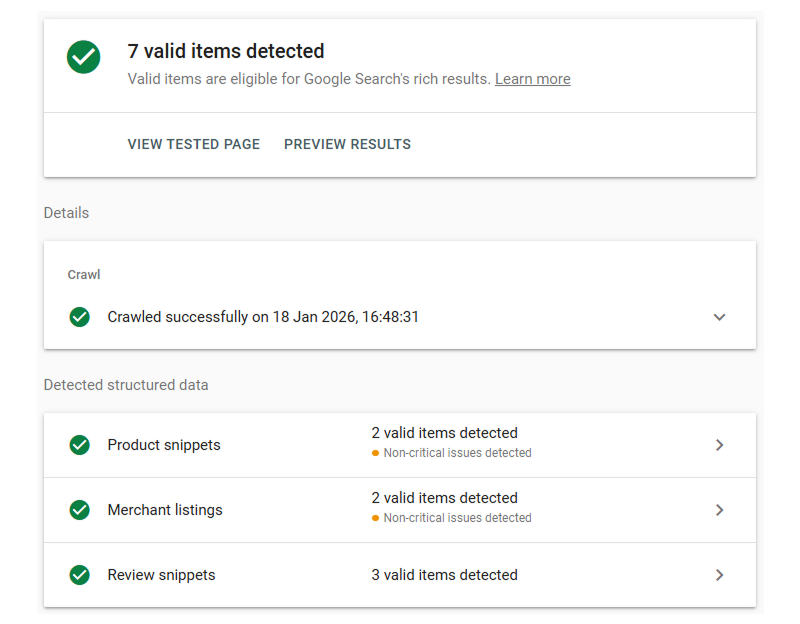
Check for complete product identifiers:
// Add to temporary plugin - remove after audit
add_action('admin_init', 'audit_product_data_quality');
function audit_product_data_quality() {
    if (!isset($_GET['audit_products'])) return;

    // Check missing GTINs
    $missing_gtins = new WP_Query(array(
        'post_type' => 'product',
        'posts_per_page' => -1,
        'meta_query' => array(
            array('key' => '_gtin', 'compare' => 'NOT EXISTS')
        ),
        'fields' => 'ids'
    ));

    // Check products without SKUs
    $missing_skus = new WP_Query(array(
        'post_type' => 'product',
        'posts_per_page' => -1,
        'meta_query' => array(
            array('key' => '_sku', 'compare' => '', 'value' => '')
        ),
        'fields' => 'ids'
    ));

    echo '<h2>Product Data Quality Audit</h2>';
    echo '<p>Missing GTINs: ' . $missing_gtins->found_posts . '</p>';
    echo '<p>Missing SKUs: ' . $missing_skus->found_posts . '</p>';

    die();
}
Access this at yoursite.com/wp-admin/?audit_products=1.
Audit checklist:
Titles and descriptions: Are they descriptive and keyword-rich? AI agents match queries against this text.
GTINs/SKUs: Do products have manufacturer identifiers? AI agents use these to verify products across sources.
Inventory levels: Is stock status accurate in real-time? AI agents won’t recommend out-of-stock products if data is current.
Variant clarity: Are size/color options properly structured with variant-level data?
Warning: If your inventory isn’t accurate now, perfect schema just helps AI agents discover out-of-stock products faster. Fix inventory sync BEFORE optimizing data structure.
Focus on best-selling products first. If 20% of your products drive 80% of revenue, start there.
Use a conversion rate calculator to establish your baseline before making changes.
This audit takes about 45 minutes.
Implement Complete Product Schema Markup (60 minutes)
Schema.org Product markup is universal infrastructure every AI system relies on. Launched in June 2011, it’s been powering rich results for over a decade.
Your theme probably includes basic schema. The problem? It’s incomplete.
As the industry guidance emphasizes: structured data needs to be complete, accurate, and up to date. Most themes add name, price, and image but skip GTINs, brand, availability dates, materials, and shipping estimates.
Tip: Most WooCommerce themes include basic schema but miss critical properties. Verify with testing tools, don’t assume.
Check what exists by viewing product page source and searching for "@type": "Product".
Plugin Approach
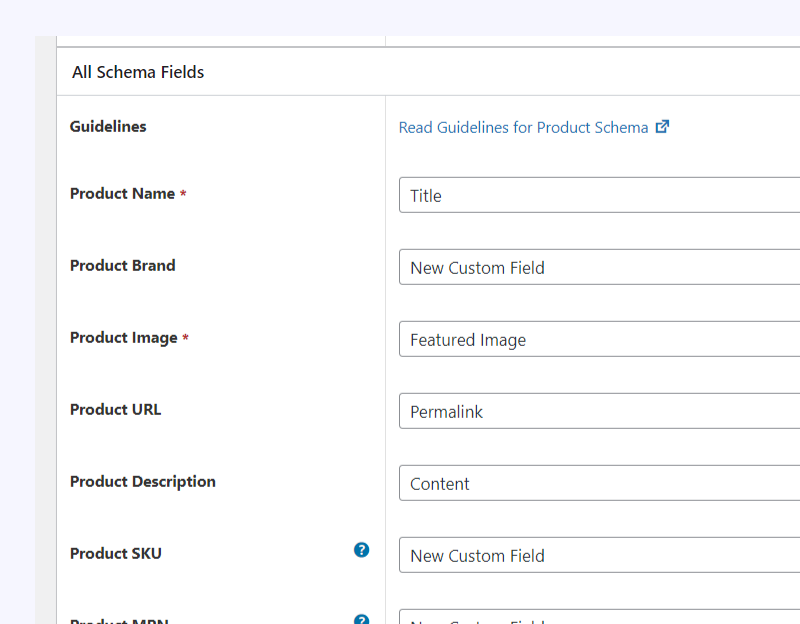
Install a schema markup plugin like Schema & Structured Data for WP & AMP for visual configuration.
Before installing, verify your theme doesn’t generate duplicate schema. Duplicates cause errors.
Warning: Don’t use schema plugins if your theme already has complete schema. Check for duplicates first.
Configure to include: name, image, description, SKU, GTIN, MPN, brand, offers (price, currency, availability), reviews, material, color, shipping details.
Code Approach
Add complete schema to your product template:
// Add to child theme's functions.php
add_action('wp_footer', 'add_complete_product_schema');
function add_complete_product_schema() {
    if (!is_product()) return;

    global $product;

    $schema = array(
        '@context' => 'https://schema.org/',
        '@type' => 'Product',
        'name' => $product->get_name(),
        'description' => wp_strip_all_tags($product->get_description()),
        'sku' => $product->get_sku(),
        'image' => wp_get_attachment_url($product->get_image_id()),
    );

    // Add GTIN for machine verification
    $gtin = get_post_meta($product->get_id(), '_gtin', true);
    if ($gtin) {
        $schema['gtin'] = $gtin;
    }

    // Add brand - critical for AI categorization
    $schema['brand'] = array(
        '@type' => 'Brand',
        'name' => get_bloginfo('name')
    );

    // Add complete offer data
    $schema['offers'] = array(
        '@type' => 'Offer',
        'url' => get_permalink(),
        'priceCurrency' => get_woocommerce_currency(),
        'price' => $product->get_price(),
        'availability' => $product->is_in_stock() ? 'https://schema.org/InStock' : 'https://schema.org/OutOfStock',
        'itemCondition' => 'https://schema.org/NewCondition'
    );

    // Add reviews if they exist
    if ($product->get_average_rating()) {
        $schema['aggregateRating'] = array(
            '@type' => 'AggregateRating',
            'ratingValue' => $product->get_average_rating(),
            'reviewCount' => $product->get_review_count()
        );
    }

    echo '<script type="application/ld+json">' . json_encode($schema, JSON_UNESCAPED_SLASHES) . '</script>';
}
This generates complete schema in JSON-LD format, Google’s recommended approach.
Test immediately using Google’s Rich Results Test.
Implementation takes 60 minutes with code, 30 minutes with a plugin.
Add Product Identifiers AI Agents Trust (30 minutes)
Product identifiers, GTINs, MPNs, SKUs, brand names, are how AI agents verify products across multiple sources and filter out counterfeits.
GTIN (Global Trade Item Number) is the barcode on product packaging. It includes UPCs, EANs, ISBNs.
If you resell branded products, manufacturers provide GTINs. Look on packaging, spec sheets, or manufacturer websites.
Warning: Never invent GTINs. AI systems cross-reference identifiers across sources. Fake GTINs hurt credibility more than empty fields.
For handmade, private label, or custom products without manufacturer GTINs, leave the field empty. Use MPN or your SKU instead.
Brand name matters for AI filtering. If you resell Nike shoes, brand is “Nike” not your store name. For private label, use your registered business name consistently.
Add a custom GTIN field:
// Add GTIN field to product edit screen
add_action('woocommerce_product_options_general_product_data', 'add_gtin_field');
function add_gtin_field() {
    woocommerce_wp_text_input(array(
        'id' => '_gtin',
        'label' => 'GTIN / UPC / EAN',
        'desc_tip' => true,
        'description' => 'Product barcode from manufacturer - required for AI discovery'
    ));
}

// Save GTIN field
add_action('woocommerce_process_product_meta', 'save_gtin_field');
function save_gtin_field($post_id) {
    $gtin = isset($_POST['_gtin']) ? sanitize_text_field($_POST['_gtin']) : '';
    update_post_meta($post_id, '_gtin', $gtin);
}
For bulk adding GTINs, export products to CSV, add the GTIN column, then import back.
Remember: Use actual manufacturer brands for resold products. For private label, use your registered business name consistently.
Adding identifiers takes 30 minutes setup, then becomes part of your workflow.
Create Machine-Readable Product Feeds (90 minutes)
As industry guidance emphasizes: feeds must expose product data clearly for AI agents. Structured data needs to be complete, accurate, and up to date.
Even without running Google Shopping ads, set up Google Merchant Center. It’s the best free diagnostic for product data quality.
A clean Merchant Center feed means your data is structured correctly for ANY system, UCP, ChatGPT, future protocols.
Setting Up Merchant Center
Create a Google Merchant Center account. Link it and verify website ownership through Google Search Console.
Install the official Google Listings & Ads plugin. It syncs your product catalog automatically.
Configure business details: shipping, tax, returns, product category mappings.
Give the feed a few hours to sync, then check for errors.
Common Feed Errors
Feed errors reveal universal product data problems:
Missing GTIN errors: Products lack identifiers. AI agents can’t verify without them.
Invalid price errors: Displayed price doesn’t match structured data, or sale prices lack end dates.
Missing availability errors: No clear stock status or shipping times.
Image quality errors: Images too small, low resolution, or have promotional overlays.
Category errors: Products lack proper categories or use vague names.
Tip: Set up Merchant Center even without running ads. It’s the best free diagnostic, if Google can’t understand your products, AI agents can’t either.
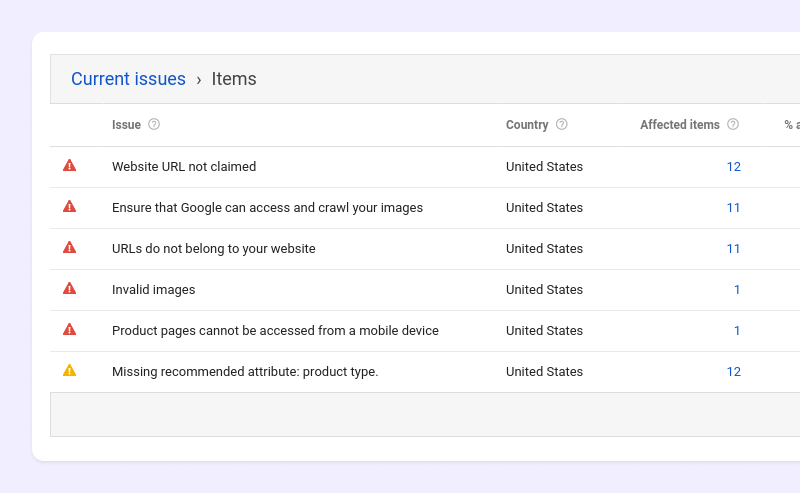
Work through errors systematically. Start with issues affecting the most products.
Warning: Don’t ignore ‘optional’ fields. Shipping weight, product_detail, and custom_label aren’t required by Google, but AI agents use them for comparisons.
Optimize Feeds Beyond Basic Requirements
Add fields AI agents care about:
shipping_weight: Exact weight for calculations. Check a volumetric weight calculator for bulky international shipments.
product_detail: Material composition, key features, technical specs.
custom_label: Best seller status, seasonal items, clearance for AI categorization.
unit_pricing_measure: Price per unit (per ounce, per count) for AI price comparisons.
Customize your feed:
// Add custom attributes to product feed
add_filter('woocommerce_gpf_elements', 'add_custom_feed_attributes');
function add_custom_feed_attributes($elements, $product) {
    // Add shipping time - critical for AI recommendations
    $elements['shipping_label'] = array(
        'value' => 'Ships in 1-2 business days',
        'compare' => false
    );

    // Add detailed material info
    $material = get_post_meta($product->get_id(), '_material', true);
    if ($material) {
        $elements['product_detail'] = array(
            'value' => $material,
            'compare' => false
        );
    }

    return $elements;
}
Use a profit margin calculator to verify prices maintain healthy margins before AI agents surface them to price-conscious shoppers.
Initial setup takes 90 minutes. Monthly maintenance takes 15-30 minutes.
Make Inventory Data Accurate and Real-Time (45 minutes)
Inventory accuracy is critical for AI recommendations. If your “in stock” items are actually 2-week backorders, customers blame you after ordering.
AI agents prioritize products with clear, accurate availability data.
Basic stock status isn’t enough. Add estimated shipping times, pre-order handling, and backorder status.
Tip: Add shipping time estimates, “Ships in 1-2 business days” is more valuable than just “available.” AI agents prioritize faster fulfillment.
Add shipping time to schema:
// Add shipping time to product schema
add_filter('woocommerce_structured_data_product', 'add_shipping_time_schema');
function add_shipping_time_schema($markup) {
    global $product;

    if ($product->is_in_stock()) {
        $markup['offers']['shippingDetails'] = array(
            '@type' => 'OfferShippingDetails',
            'deliveryTime' => array(
                '@type' => 'ShippingDeliveryTime',
                'handlingTime' => array(
                    '@type' => 'QuantitativeValue',
                    'minValue' => 1,
                    'maxValue' => 2,
                    'unitCode' => 'DAY'
                ),
                'transitTime' => array(
                    '@type' => 'QuantitativeValue',
                    'minValue' => 3,
                    'maxValue' => 5,
                    'unitCode' => 'DAY'
                )
            )
        );
    }

    return $markup;
}
For pre-orders, specify availability dates:
// Add pre-order availability date
if ($product->is_on_backorder()) {
    $release_date = get_post_meta($product->get_id(), '_release_date', true);
    if ($release_date) {
        $markup['offers']['availabilityStarts'] = date('c', strtotime($release_date));
    }
}
If you use a POS, ERP, or external warehouse, ensure real-time sync. Stock levels updating once daily aren’t accurate enough.
Configure webhooks to push inventory updates immediately when stock changes.
Warning: AI agents don’t forgive inventory inaccuracies. Fix sync issues before AI shopping grows.
For stores with stock notification systems, ensure back-in-stock notifications trigger accurately when inventory changes.
Setting up accurate inventory takes 45 minutes initially, plus ongoing sync maintenance.
Structure Product Variants Properly (30 minutes)
Product variations need proper structure for AI agents to recommend the right size, color, or configuration.
Each variation needs variant-level data, its own price, SKU, stock status, attributes. AI agents need this, not just parent product information.
Each variant should have its own GTIN if manufacturers use different barcodes. Using the parent GTIN for all variants is incorrect.
Remember: Each variant needs its own GTIN if manufacturers provide different barcodes. Don’t reuse the parent product GTIN.
Variant-level inventory matters. AI agents understand “size M is out of stock but L is available” but ONLY if your data structure supports variant-specific inventory.
Images for each variant help AI agents confirm recommendations. If you sell a shirt in 5 colors, each color needs its own product image.
Use consistent terminology. “Blue,” “Navy Blue,” and “Dark Blue” mean the same to humans but AI agents treat them as different options.
Tip: Pick one term and stick with it. Use WooCommerce’s global attribute system to enforce consistency.
Ensure variation data appears in schema:
// Add variation data to product schema
add_filter('woocommerce_structured_data_product', 'add_variation_schema');
function add_variation_schema($markup) {
    global $product;

    if ($product->is_type('variable')) {
        $variations = $product->get_available_variations();
        $offers = array();

        foreach ($variations as $variation_data) {
            $variation = wc_get_product($variation_data['variation_id']);

            $offer = array(
                '@type' => 'Offer',
                'sku' => $variation->get_sku(),
                'price' => $variation->get_price(),
                'priceCurrency' => get_woocommerce_currency(),
                'availability' => $variation->is_in_stock() ? 'https://schema.org/InStock' : 'https://schema.org/OutOfStock'
            );

            // Add variant GTIN
            $gtin = get_post_meta($variation->get_id(), '_gtin', true);
            if ($gtin) {
                $offer['gtin'] = $gtin;
            }

            $offers[] = $offer;
        }

        $markup['offers'] = $offers;
    }

    return $markup;
}
Auditing and fixing variants takes 30 minutes.
Testing Your Data Quality (30 minutes)
Testing isn’t one-time. Product data quality degrades as you add products, import updates, or change themes.
Run Google’s Rich Results Test on 10-20 products across categories.
Consistent errors indicate template issues. Random errors indicate data entry problems.
Use the Schema.org Validator for syntax checking against full specifications.
Check Google Merchant Center diagnostics for feed-level errors.
Test manually with AI chatbots. Ask ChatGPT, Claude, or Google’s AI Mode to find products like yours by description, not by store name.
Tip: Ask ChatGPT or Claude to find products by description. Document what shows up and what doesn’t.
If AI agents consistently miss your products for relevant queries, your structured data is incomplete.
Schedule monthly checks:
- Test 10 random products in Rich Results Test
- Check Merchant Center for new feed errors
- Verify inventory accuracy on best-sellers
- Confirm new products have complete data
Create a monitoring dashboard widget:
// Admin dashboard widget for monitoring
add_action('wp_dashboard_setup', 'schema_monitoring_widget');
function schema_monitoring_widget() {
    wp_add_dashboard_widget('schema_monitor', 'Product Schema Status', 'display_schema_status');
}

function display_schema_status() {
    $missing_gtin = new WP_Query(array(
        'post_type' => 'product',
        'posts_per_page' => -1,
        'meta_query' => array(
            array('key' => '_gtin', 'compare' => 'NOT EXISTS')
        ),
        'fields' => 'ids'
    ));

    echo '<p><strong>Products Missing GTIN:</strong> ' . $missing_gtin->found_posts . '</p>';
    echo '<p><a href="' . admin_url('edit.php?post_type=product') . '">Review Products</a></p>';
}
Initial testing takes 30 minutes. Monthly checks take 15 minutes.
The “Buy-ability” Problem WooCommerce Needs to Solve
Here’s the hard truth about where WooCommerce stands: you can optimize product data all you want, but UCP requires what Search Engine Land calls “buy-ability”, your system needs to be queryable by AI agents, not just crawlable.
As the Search Engine Land analysis explains, it’s not enough to have structured data on product pages. Your commerce system needs UCP-style APIs or agent-ready endpoints that AI agents can query directly.
This requires engineering work beyond typical WooCommerce plugin capabilities.
Shopify built this from the ground up with Google. WooCommerce is waiting for someone to build it.
What WooCommerce Needs
UCP-compatible APIs: REST endpoints that follow Universal Commerce Protocol specifications for checkout, inventory queries, and order management.
Real-time inventory queries: APIs that let AI agents check stock status instantly, not relying on cached product pages.
Dynamic pricing support: Ability to calculate taxes, shipping, and discounts in response to AI agent queries.
Secure transaction handling: OAuth integration and payment tokenization following Agent Payments Protocol (AP2).
This isn’t something you can code in functions.php. It requires platform-level integration or sophisticated plugin development.
Watch for WooCommerce Solutions
As of January 2026, one experimental plugin exists labeled “NOT production-ready.” Don’t use experimental plugins on live stores.
Warning: Don’t use experimental plugins on live stores. Wait for established developers to release tested solutions.
When evaluating future UCP plugins, look for:
- Security audits from reputable firms
- Active support from developers with track records
- Integration with WooCommerce’s official extensions
- Endorsement from established developers
Monitor these resources:
WooCommerce Feature Requests: The official UCP feature request will see updates when solutions are announced.
WooCommerce Official Blog: Major features are announced here first.
Established Plugin Developers: Watch developers behind major WooCommerce extensions. They’ll likely release UCP solutions first.
Universal Commerce Protocol GitHub: The UCP specification repository shows active development.
Tip: Bookmark the feature request and check monthly for updates.
Why Data Preparation Still Matters
Don’t wait for UCP support to optimize product data. The foundation you build now helps your store TODAY with:
- Google Shopping performance
- ChatGPT and Claude product queries
- Traditional search visibility
- Comparison shopping engines
- Voice assistant queries
When official WooCommerce UCP support launches, stores with complete, accurate product data will implement it in hours. Stores that waited will spend weeks cleaning up their catalog first.
Your competitors are in two groups: those with UCP (Shopify) and those without (most WooCommerce stores). You can’t change platforms overnight, but you can be ready to move fast when WooCommerce catches up.
The work you do now pays dividends immediately. UCP support is the future. Better product data quality is the present.
