

Customer adds $85 worth of products to their cart. Clicks through to checkout. Sees $18 shipping. Tab closes.
Table of Contents
You just lost an $85 sale, and this is happening dozens of times a day in your store.
Research from Baymard Institute shows unexpected shipping costs are the top reason for cart abandonment, causing 48% of shoppers to leave without purchasing. Not slow checkout. Not complicated forms. Shipping costs.
Here’s the thing – you can’t always offer free shipping, and sometimes you shouldn’t. But you can be a lot smarter about how you handle shipping costs without destroying your margins.
This guide covers how to calculate your actual break-even point, five strategies that work for different business models, and how to present shipping costs without killing conversions.
Total implementation time: 2-3 hours.
Calculate Your Actual Break-Even Point First
Before you make any decisions about shipping strategy, you need real numbers. Not guesses, not what feels right – actual data from your store.
The numbers you actually need
- Average order value (AOV) –
WooCommerce → Analytics → Orders - Average shipping cost per order – what you actually pay carriers (not what customers pay)
- Your actual product margin – contribution margin after cost of goods (COGS), not including shipping
- Current conversion rate – so you can measure impact (if using Google Analytics or Jetpack)
Most store owners skip #2 and #3, using what customers pay for shipping or revenue margins instead of actual costs. That’s how you end up offering “free shipping” that bleeds money.
Note: WooCommerce Analytics doesn’t track what YOU pay for shipping or your product costs (COGS). You’ll need to calculate these separately from your carrier invoices and inventory costs.
The break-even formula explained
The math behind free shipping is straightforward: your product contribution margin needs to absorb the shipping cost you pay.
Here’s the formula:
Break-even free shipping threshold = Shipping cost ÷ Contribution margin
Where:
- Shipping cost = What you actually pay carriers per order
- Contribution margin =
(Selling price - COGS) ÷ Selling price(as decimal, e.g., 40% = 0.40)
Real example
Store metrics:
- Average shipping cost: $8 (what they pay FedEx)
- Contribution margin: 40% (after COGS, before shipping costs)
- Calculation: $8 ÷ 0.40 = $20
What this means:
- They need $20 in product sales to generate $8 in contribution margin
- That $8 contribution covers the $8 shipping cost
- True break-even at $20 cart subtotal
But break-even isn’t your goal
Break-even is your absolute floor, but smart strategy means setting your threshold above your AOV to drive upsell behavior.
Strategic formula:
Free shipping threshold = (Shipping cost ÷ Contribution margin) + Average order value
Using the same example:
- Break-even point: $20
- Current AOV: $65
- Strategic threshold: $20 + $65 = $85
Why this works:
- Customers currently spend $65 on average
- Setting threshold at $85 encourages them to add $20 more
- That extra $20 covers your shipping cost at 40% margin
- You maintain profitability while driving larger carts
How to get your real shipping cost average
WooCommerce doesn’t track what YOU pay carriers – it only stores what customers pay. You need to calculate this manually.
Option 1: Manual calculation
- Go to
WooCommerce → Orders - Export last 30 days of orders
- Add up what you paid carriers from your FedEx/UPS invoices
- Divide by number of orders
Option 2: Track in order meta (custom solution)
If you want to track actual carrier costs in WooCommerce, you’ll need a custom solution or plugin like Cost of Goods for WooCommerce.
Important considerations
High-margin products can subsidize free shipping; low-margin products can’t. Run calculations separately for:
- Your top 20% products by margin (can offer lower thresholds)
- Your low-margin products (may need higher thresholds or exclude from free shipping)
Warning: If your contribution margin is under 30% and shipping costs more than 8-10% of order value, free shipping might not work without raising prices.
When Free Shipping Actually Hurts
Most shipping advice assumes free shipping is always the goal. Sometimes it’s a terrible idea.

Low-margin products
If you’re selling commodity items with 15-20% margins, free shipping kills you.
Example: An office supply store with AOV of $45, shipping averaged $9, and margins at 22% would need to double their AOV to offer free shipping profitably.
A better approach: transparent flat-rate shipping at $6.95. Conversions can actually improve because customers appreciate the honesty.
The psychology here matters: customers shopping commodity items already compare prices aggressively. They know what things cost.
When you bury shipping in inflated product prices, you lose on price comparison before they even reach checkout. Transparent shipping lets your actual product prices stay competitive.
Heavy or bulky products
Furniture, auto parts, large electronics – dimensional weight pricing from carriers makes free shipping mathematically possible but strategically terrible.
Example:
- Product cost: $180
- Current price: $300
- Profit: $120
- Shipping cost: $85
To offer free shipping profitably, they’d need to price it at $385 ($180 cost + $120 profit + $85 shipping).
Here’s the problem: Customers pay $385 either way ($300 + $85 shipping vs $385 with free shipping). But when shopping online:
Competitor listing:
- Price: $300
- Shipping: $85 (calculated at checkout)
Your listing:
- Price: $385
- Shipping: Free
Customer perception: Your chair appears 28% more expensive in search results and comparison shopping. Most customers never make it to your checkout to see the “free shipping” benefit.
Customers shopping these categories expect to pay shipping. Transparent shipping pricing keeps your product prices competitive where it matters, in search results and price comparisons.
International orders
Free shipping promises that explode when customs bills arrive destroy trust faster than charging upfront.
Either show estimated duties/taxes at checkout (DDP shipping) or clearly state customers pay customs (DDU).
Legal Compliance Note: For international orders, Delivered Duty Paid (DDP) means you handle all import fees; Delivered Duty Unpaid (DDU) means customer pays customs. Always disclose which you’re using to avoid customer complaints and chargebacks. If selling to EU customers, ensure your GDPR compliance for ecommerce covers shipping data handling.
Subscription models
This is the exception where free shipping usually makes sense. Subscription customers expect it as part of the value proposition.
The math works because customer lifetime value (LTV) is typically 5-10× the first order value. You can absorb shipping costs across multiple orders rather than trying to break even on each individual transaction.
Strategy: Charge shipping on the first order if needed, but make subsequent subscription shipments free. Customer retention rates on subscriptions with free shipping are significantly higher than those charging recurring shipping fees.
Example calculation:
- First order: $50 + $8 shipping (customer pays)
- Monthly subscription: $50 with free shipping (you pay $8)
- Customer stays 12 months
- LTV: $600 vs shipping costs of $96 ($8 × 12 months)
- Net after shipping: $504 vs one-time customer at $50
The recurring revenue model justifies the shipping investment.
Five Shipping Strategies That Work
Pick the strategy that matches your margins and AOV. You can combine approaches later, but start with one.
Strategy 1: Threshold-based free shipping
Best for: Moderate margins (30-50%), AOV between $40-150
Set your threshold 20-30% above current AOV. Not arbitrary round numbers – use your break-even calculation from above.
The concept is simple: encourage larger orders by offering free shipping once customers hit a specific cart value. This only works when the increased order value generates enough additional profit to absorb shipping costs.
Native WooCommerce setup:
Go to WooCommerce → Settings → Shipping → Shipping Zones. Edit your zone, add a shipping method, and choose Free Shipping.
Set the requirement to “A minimum order amount” and enter your calculated threshold. Save.
That’s it. Takes 5 minutes.
The key is adding progress messaging so customers know how close they are. Show “Add $X more for free shipping” in your cart.
This taps into completion psychology – customers who are $8 away will often add another item to qualify.
You can display this message above your cart totals by hooking into WooCommerce’s cart display. The logic checks cart subtotal against your threshold, calculates the difference, and displays it only when customers are below the threshold.
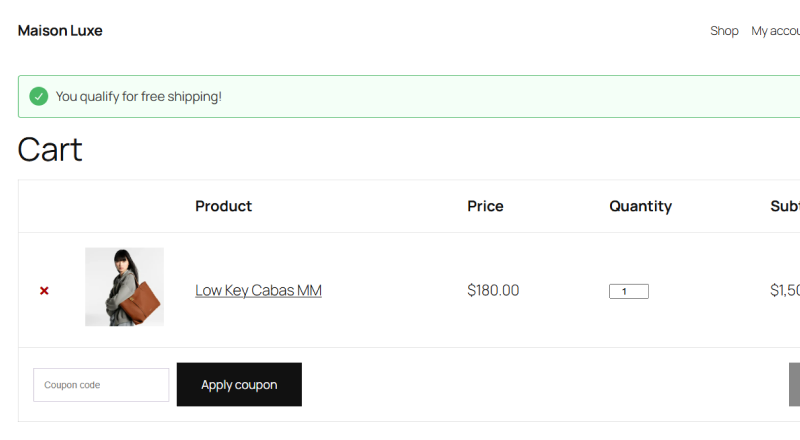
Here’s a basic implementation:
// Add shipping progress message to cart
add_action( 'woocommerce_before_cart', 'show_free_shipping_progress' );
function show_free_shipping_progress() {
    $threshold = 75;
    $current = WC()->cart->subtotal;

    if ( $current < $threshold ) {
        $remaining = $threshold - $current;
        $message = sprintf(
            'Add %s more for free shipping!',
            wc_price( $remaining )
        );
        wc_add_notice( $message, 'notice' );
    } else {
        wc_add_notice( 'You qualify for free shipping!', 'success' );
    }
}
This hooks into the cart display, calculates the difference between the current cart value and your threshold, and displays the appropriate message.
Warning: Don't set your threshold so high that it frustrates customers. If your AOV is $50 and you set free shipping at $150, customers will ignore it as unrealistic.
The 20-30% above current AOV guideline exists because it's achievable but still requires customers to add items.
Strategy 2: Flat-rate shipping
Best for: Similar product sizes, predictable costs, margins 25-40%
Pick one flat rate that covers most orders with some cushion. Customer psychology prefers "always $6.95" over "calculated at checkout."
The appeal here is simplicity and predictability. Customers appreciate knowing exactly what shipping costs before they even browse your products.
WooCommerce native approach:
Go to WooCommerce → Settings → Shipping → Shipping Zones. Add a flat rate shipping method. Set your cost.
Display this prominently: "Flat $6.95 shipping on all orders" in your header or announcement bar.
The pricing strategy:
Calculate your median shipping cost, not average. Average gets skewed by outliers. Median represents what most orders actually cost.
Add 10-15% cushion for handling and occasional heavy orders. This protects your margins while keeping the rate reasonable.
Example: if median shipping is $6, charge $6.95 flat. You'll slightly subsidize heavy orders, slightly profit on light orders, and maintain predictable margins overall.
Warning: Flat-rate only works if your products are reasonably similar in size and weight. If you sell both jewelry and furniture, you need zoned or calculated shipping instead.
Tip: Combine flat-rate with free shipping threshold. "Shipping $6.95 or free on orders over $75" gives customers both predictability and an incentive to increase cart size.
Time to implement: 15 minutes.
Strategy 3: Free shipping on high-margin items only
Best for: Varied product margins, clear "hero products" with 50%+ margins
Identify which products can absorb shipping costs. Make those free shipping eligible. Everything else pays.
This requires product-level shipping classes in WooCommerce. You tag high-margin products as "free ship eligible" and set up shipping rules accordingly.
How to implement:
Go to WooCommerce → Settings → Shipping → Shipping Classes. Create a new class called "Free Ship Eligible."
Edit your high-margin products, scroll to shipping settings, and assign this shipping class.
In your shipping zone settings, create two rules:
- Free shipping for "Free Ship Eligible" class
- Flat rate or calculated shipping for everything else
The logic here: let profitable items drive customer acquisition while protecting margins on commodities.
Real-world example:
A supplement store I worked with had 60% margins on proprietary blends and 20% margins on generic vitamins. We made the proprietary products free shipping.
Generic vitamins charged $5.95 shipping.
Customers bought the profitable items, often adding low-margin products to the cart as add-ons. Average margin per order increased from 32% to 41% while maintaining competitive pricing on price-sensitive products.
Remember: This only works if customers actually want your high-margin products. Don't try to force free shipping on items nobody's buying just because margins are good.
Time to implement: 1 hour for setup and product classification.
Strategy 4: Loyalty free shipping for repeat customers
Best for: Repeat purchase models, customer accounts, margins 30%+
Give free shipping to logged-in customers after their first purchase. First-time buyers pay shipping. Loyal customers don't.
This approach acknowledges that customer acquisition costs justify subsidizing shipping on first orders, while repeat customers have proven their lifetime value.
Implementation approach:
You need custom code or a plugin for this - WooCommerce doesn't include customer-based shipping rules natively.
The concept: create a "returning customer" user role. After first purchase, automatically upgrade users to this role using a hook on order completion.
Set shipping rules to give free shipping to this role while charging everyone else.
Here's a basic example of the user role upgrade:
function create_returning_customer_role() {
    add_role(
        'returning_customer',
        'Returning Customer',
        array(
            'read' => true,
            'customer' => true,
        )
    );
}
add_action( 'after_switch_theme', 'create_returning_customer_role' );
// Upgrade customer to "returning customer" role after first purchase
add_action( 'woocommerce_order_status_completed', 'upgrade_to_returning_customer' );
function upgrade_to_returning_customer( $order_id ) {
    $order = wc_get_order( $order_id );
    $user_id = $order->get_user_id();

    if ( $user_id ) {
        $customer = new WC_Customer( $user_id );
        $order_count = $customer->get_order_count();

        // If this is their first completed order
        if ( $order_count === 1 ) {
            $user = get_user_by( 'id', $user_id );
            $user->add_role( 'returning_customer' );
        }
    }
}
Then you'd need additional code to check the user's role during shipping calculation and apply free shipping accordingly. This gets complex quickly, which is where custom development becomes valuable.
Why this works:
Psychologically, earning free shipping feels like a reward. Customers appreciate recognition for loyalty.
Financially, repeat customers have higher lifetime value. You can afford to subsidize their shipping bec
Strategy 5: Location-based shipping tiers
Best for: National/international sellers, varied shipping costs by region, any margin level
Charge different shipping rates based on customer location. Close regions get better rates, distant regions pay actual costs.
This is honest about the reality: shipping to California from New York costs more than shipping to New Jersey. Customers in distant locations understand and expect to pay more for shipping.
The psychology behind it:
Geographic pricing feels fair because it's logical. A customer in Alaska knows they're far away. A customer in Hawaii expects higher shipping. They're not surprised by it.
What frustrates customers is when they pay the same high rate as someone across the country when they live 20 miles from your warehouse.
Native WooCommerce implementation:
WooCommerce's shipping zones are built for this. You create multiple zones with different rates based on:
- States/regions
- Postal codes
- Countries
- Or combinations
Setup in WooCommerce:
Go to WooCommerce → Settings → Shipping → Shipping Zones.
For each zone:
- Click "Add shipping zone"
- Name it clearly (e.g., "Local - Free Shipping")
- Define the region (states, postal codes, or countries)
- Add shipping methods for that zone
- Set rates for each method
- Order zones from most specific to least specific
Important: WooCommerce matches zones from top to bottom. Put your most specific zones (like postal code ranges) at the top, broader zones below.
Pro implementation example:
// Display zone-specific shipping message on product pages
add_action( 'woocommerce_before_add_to_cart_button', 'show_zone_shipping_message' );
function show_zone_shipping_message() {
    // Get customer's shipping zone
    $customer = WC()->customer;
    $postcode = $customer->get_shipping_postcode();
    $state = $customer->get_shipping_state();

    // Determine zone and show appropriate message
    if ( in_array( $state, array( 'NY', 'NJ', 'PA' ) ) && ! empty( $postcode ) ) {
        wc_add_notice(
            sprintf(
                'Local delivery! Ships for %s or free over %s',
                wc_price( 4.95 ),
                wc_price( 50 )
            ),
            'notice'
        );
    } elseif ( in_array( $state, array( 'CA', 'WA', 'OR' ) ) ) {
        wc_add_notice(
            sprintf(
                'West Coast shipping: %s flat rate',
                wc_price( 6.95 )
            ),
            'notice'
        );
    } else {
        wc_add_notice(
            sprintf(
                'National shipping: %s or free over %s',
                wc_price( 9.95 ),
                wc_price( 100 )
            ),
            'notice'
        );
    }
}
This displays shipping expectations before customers even add to cart, reducing surprise at checkout.
Communication is critical:
Warning: Don't create too many zones. 3-5 zones maximum is manageable. More than that confuses customers and complicates your logistics. Keep it simple.
Tip: Display estimated delivery time alongside shipping cost. "Fast local shipping: $4.95 (1-2 days)" converts better than just "$4.95 shipping." Speed matters as much as cost for many customers.
Advanced option: Combine location-based tiers with free shipping thresholds. Local customers need $50 for free shipping, distant customers need $100. This rewards local customers while protecting margins on long-distance shipments.
Time to implement: 30-45 minutes for basic zones, 1-2 hours for complex multi-zone setups with custom messaging.
How to Present Shipping Costs Without Killing Conversions
Strategy matters less than communication. Transparency wins.
Show costs early
The biggest conversion killer isn't shipping costs - it's surprise shipping costs.
Customers who see estimates on product pages rarely abandon at checkout over shipping. Customers who discover costs at the final step abandon constantly.
Add shipping estimates to product pages. WooCommerce includes a shipping calculator widget you can display anywhere.
Show a simple message: "Shipping: $6.95 flat rate" or "Free shipping on orders over $75."
Where to show estimates:
- Product pages (above or near add-to-cart)
- Cart page (obviously)
- Header or announcement bar site-wide
The earlier customers see costs, the less shocking they are at checkout.
Clear messaging beats clever marketing
Good example: "Shipping: $7.95 flat rate to all US addresses"
Bad example: "Affordable shipping options available at checkout!"
The second example forces customers to guess. They abandon rather than continue to find out.
Use plain language. State the cost. Don't hide behind "calculated at checkout" when you know most orders will be $6-8.
Tip: Test your shipping messaging with actual customers before rolling out. Send an email to 20 recent customers asking "Is our shipping policy clear?" Their responses will tell you if you're being transparent or confusing.
Timing matters more than you think
When customers see costs affects their perception more than the amount itself.
Show shipping estimates before customers invest time filling carts. A $10 shipping charge shown on the product page feels reasonable.
The same $10 shown after customers spend 10 minutes shopping feels like a bait-and-switch.
This is why Amazon shows Prime eligibility on product listings. They're not hiding costs until checkout - they're setting expectations upfront.
Info block: Research on price transparency shows customers accept higher costs when disclosed early versus lower costs revealed late. Trust matters more than the dollar amount.
The progress bar psychology
"Add $18 more for free shipping" messaging works because of completion psychology. Customers close to a threshold will add items to qualify.
But this backfires if your threshold is unrealistic. If someone has a $25 cart and needs $100 for free shipping, they won't add $75 worth of products. They'll abandon.
The sweet spot: show progress when customers are within 30-40% of your threshold. Below that, just show the flat rate.
Warning: Don't make the threshold feel manipulative. If your AOV is $60 and you set free shipping at $62, customers feel like you're gaming them.
Make it meaningful - at least 15-20% above current AOV.
Testing Your Shipping Strategy (Realistic Approach)
For stores with decent traffic (500+ orders/month)
You have enough volume to run meaningful tests. Set up A/B tests comparing different thresholds or approaches.
What to actually test: revenue per visitor, not just conversion rate. A 3% conversion rate at $50 AOV beats a 4% conversion rate at $35 AOV.
Use Google Optimize or your analytics platform's native A/B testing tools. Run tests for minimum 30-45 days to account for weekly fluctuations and get statistical significance.
Metrics that matter:
- Revenue per visitor (total revenue ÷ total visitors)
- Cart abandonment rate
- Average order value
- Customer lifetime value (if you can track it)
Vanity metrics to ignore:
- Conversion rate alone (without AOV context)
- Add-to-cart rate (doesn't predict completion)
For low-traffic stores (under 500 orders/month)
You don't have enough traffic for statistically significant A/B tests. Trying to run formal split tests will take 6-12 months to get conclusive data.
What to do instead:
Sequential testing: Run threshold A for 60 days, record all metrics. Switch to threshold B for 60 days, compare results.
Not as rigorous as simultaneous A/B testing, but gets you directional data. Control for seasonality by testing the same months year-over-year if possible.
Customer feedback: Actually ask customers. Survey cart abandoners if you capture emails at cart.
Exit-intent popup with one question: "What prevented you from completing your purchase?"
Phone calls with 10 recent customers will teach you more than months of inconclusive split tests.
Directional indicators: Watch trends over time. Monitor cart abandonment rate in WooCommerce → Analytics.
Check if AOV is trending up or down. Look at email responses when you communicate shipping policy changes.
Implementation approach for small stores:
Pick ONE strategy from this post. Implement it fully. Give it 90 days minimum.
Make small adjustments quarterly, not complete overhauls every month. Focus as much on clear communication as on the math.
Reality check: If you're doing under 100 orders/month, don't obsess over A/B testing shipping thresholds.
Pick a reasonable approach based on your margins, implement it well, and focus on getting more traffic.
Conversion rate optimization matters more at scale. At low volume, adding 500 more visitors per month will impact revenue more than optimizing from 2.2% to 2.4% conversion.
Tip: The fastest validation for small stores? Change your shipping strategy, then email your customer list asking for feedback.
Your existing customers will tell you immediately if the new approach feels fair or frustrating. You'll get qualitative insights that matter more than statistical significance at low volumes.
Pick One Approach, Then Test
Here's what to do this week.
Step 1: Calculate your break-even (20 minutes)
Use the formula from the beginning of this post. Get your real average shipping cost from WooCommerce data, know your actual profit margins (not revenue margins), and calculate the minimum order value where free shipping doesn't lose money.
Don't skip this. Every strategy in this post depends on knowing these numbers.
Step 2: Pick ONE strategy and implement it (2-3 hours)
Choose based on your business model:
- Moderate margins, AOV $40-150 → Threshold-based free shipping
- Similar product sizes, predictable costs → Flat-rate shipping
- Varied margins, clear hero products → Free shipping on high-margin items only
- Repeat purchase business → Loyalty free shipping for logged-in customers
Set it up in WooCommerce using the official shipping documentation. Add the messaging throughout your site - product pages, cart, checkout.
Test the complete customer experience yourself. Place a test order and see what your customers will see.
Step 3: Monitor and adjust over the next 90 days
Track revenue per visitor, not just conversion rate. Watch cart abandonment rate in WooCommerce Analytics.
Get actual customer feedback through email surveys or phone calls with recent customers.
Make small adjustments quarterly, not weekly. Constantly changing your shipping approach destroys trust.
The reality: there's no perfect shipping strategy that works for every store. Your margins, product mix, average order value, and customer expectations all vary.
What works for your competitor might tank your conversions.
Start somewhere based on your actual data. Measure everything. Adjust based on what the numbers tell you, not what you think should work.
Shipping costs don't have to kill conversions. Surprise shipping costs kill conversions.
The difference is transparency, timing, and being strategic about when you can absorb costs versus when customers expect to pay them.
Additional Resources
Research & Statistics:
- Baymard Institute Cart Abandonment Research - Comprehensive cart abandonment statistics and checkout usability studies
- Baymard Checkout Usability Study - In-depth research on checkout flow optimization
WooCommerce Documentation:
- Setting Up Shipping Zones - Official guide to configuring shipping zones
- Core Shipping Options - Documentation for flat rate, free shipping, and local pickup
- WooCommerce Shipping Classes - Guide to using shipping classes for product-level shipping rules
Compliance & Legal:
- GDPR for Ecommerce - Understanding GDPR compliance for online stores
- Ecommerce Compliance Overview - Comprehensive guide to ecommerce legal requirements
Tools:
- Google Optimize - Free A/B testing tool for ecommerce stores
- WooCommerce Analytics - Using built-in analytics to track store performance
Our WooCommerce Plugins:
- Review Follow-up - Automate review requests to build social proof
- Restock Alerts - Notify customers when out-of-stock items return
- Product Expiry Manager - Manage and auto-hide expired products
